
Ngpcraft is a Neo Geo Pocket and Neo Geo Pocket Color emulator that combines the speed of a native C++ heart with the elegance of a graphical interface in PyQt6. Its engine is meticulously calibrated on the original hardware, adjusting each microprocessor cycle and flash memory access time so that self-clocked games like Densha de Go finally rotate to their 30 real frames per second.
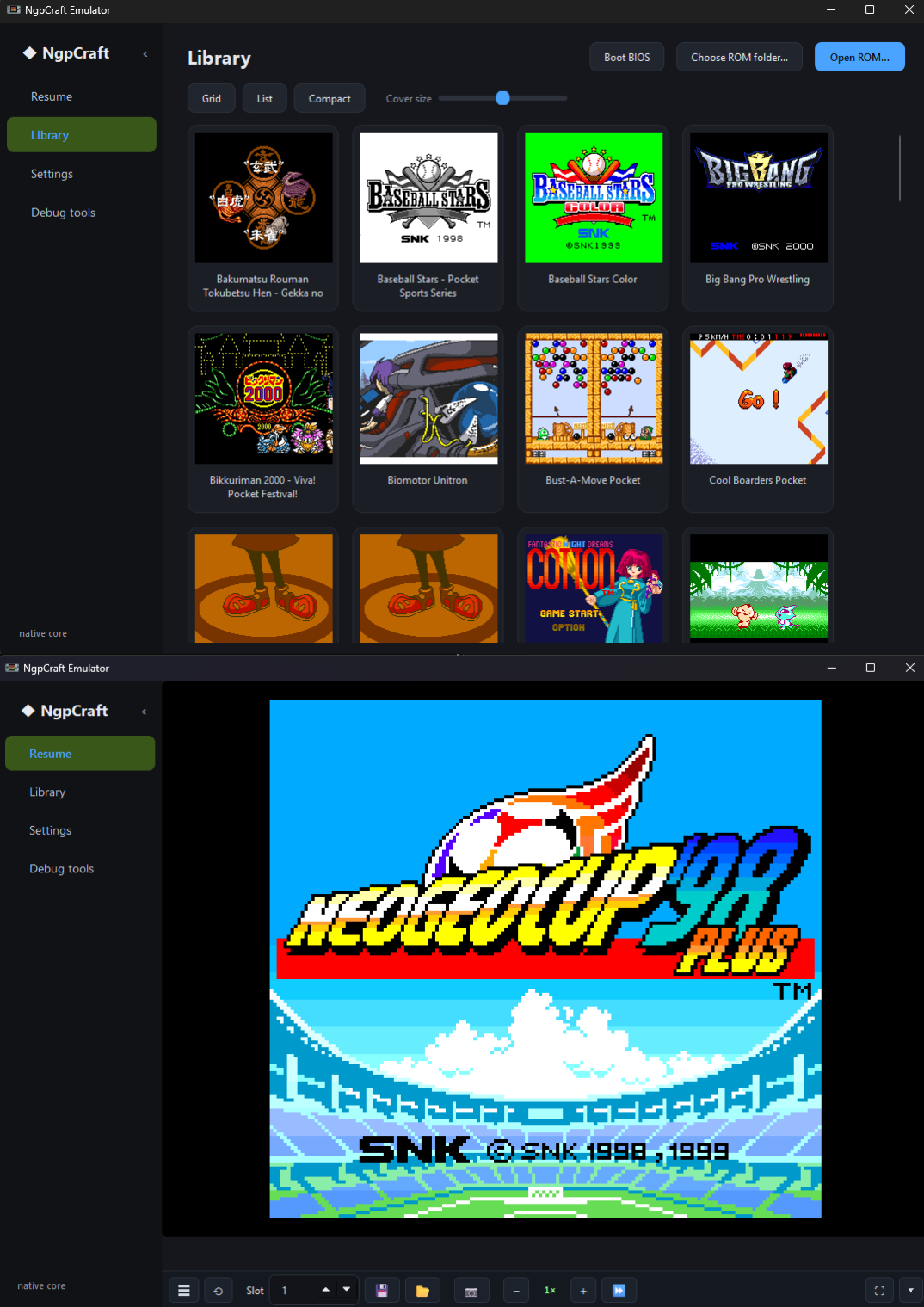
The gaming experience is particularly neat thanks to a dynamic library with clutch thumbnails, advanced search, sorting by playing time and managing favorites. The console reproduces the official BIOS boot with its original intro sequence, keeps the button stack in memory to keep the date and RTC clock up to date, and even triggers the alarms built into the games at the right time.
For visual and hardware comfort, the software adapts to your desires thanks to a windowed or full-screen resizing, various video filters (LCD-grid, CRT, scanlines), the management of dark and light themes without restarting, as well as a complete support for Xbox controllers (XInput) with adjustable autofire and intuitive remapping on a visual diagram of the console.
On the features side in part, you have 8 save slots per game, NVRAM internal backups, a live rewind option (rewind with buffer from 10 to 30 seconds), image-per-frame step-by-step, one-click screenshot (F12) and acceleration or slowing from 0.25× to 4×. Even black and white cartridges enjoy an automatic coloring palette when running in Pocket Color mode.
Finally, it is a great tool for the development and preservation of ROMs: its engine integrates a real complete debugger (stop points, battery inspection, RAM search, export audio VGM), an automatic analysis module testing the games on 400 frames without crashing, as well as a generator of ultra-detailed crash reports in case of error on an instruction.
Changelog:
New — Fan-translation toolkit (Debug tools, F1)
A full set of tools for translating any game, all driven by a character table you load (.tbl, the standard romhacking format). Nothing is game-specific, and every result shows its ROM file offset so a hit maps straight to a byte in the cartridge.
Text — decode a region into readable strings, search for a phrase by its exact bytes, scan a whole region for every string at once (an exportable script dump), or run a relative search that finds a word under an unknown encoding by its letter spacing (no table needed).
Crack — type a few words you can read on screen and it builds the .tbl for you: each word is located automatically (or pinned with word @ offset) and its bytes become a real table you can edit, save, or use immediately. Works even on non-alphabetical encodings.
Pointers — find every pointer to an address (to repoint a moved string) or locate the pointer tables themselves. 16 / 24 / 32-bit little-endian, base offset, tolerance.
Compare — byte-diff the running cartridge against a second .ngc. An existing patch's changed ranges are the text, shown decoded on both sides.
Tile viewer — hover any tile to read its index, VRAM address, referencing planes and 16 raw bytes; click to copy.
New — Load tab (live resource gauges)
Green-to-red bars that update as the game runs:
Sprites (OAM) — active sprites out of 64.
Char RAM — distinct tiles referenced out of 512.
Frame rate — whether the game is finishing its work in time (the honest "is it overloaded" signal).
Both VRAM gauges are exact counts read straight from video memory.
Fullscreen & window
Fullscreen now hides the sidebar and toolbar for the game alone (optional, on by default).
In fullscreen, the toolbar auto-reveals when you move the mouse and hides again when it's still — always reachable, never in the way.
Exit fullscreen with Esc or a double-click (double-click also enters it).
The toolbar can auto-hide when the mouse goes idle and reappear on any move, in windowed mode too (optional, on by default).
The main window and the debug window can now be made much smaller — long help text used to force them very wide; they resize freely now.
Fixes
Aspect ratio no longer stretches after toggling fullscreen or hiding the sidebar/toolbar. (The frame was being scaled to the old canvas size, and a paused game never corrected it.)
Library covers no longer render as white boxes (issue #2): covers are rendered by booting each game, which needs bios.bin — with none, the cards now stay blank and say why, instead of caching a blank frame forever. They render automatically once a BIOS is set.
Notes
New options live in Settings > Video: Hide UI in fullscreen, Auto-hide toolbar when idle.
If a game looks stretched to 16:9 in fullscreen, set Settings > Video > Aspect to Fit window or Pixel-perfect (Stretch fills the screen ignoring the 160:152 ratio, by design).
English and French translations updated.
The gaming experience is particularly neat thanks to a dynamic library with clutch thumbnails, advanced search, sorting by playing time and managing favorites. The console reproduces the official BIOS boot with its original intro sequence, keeps the button stack in memory to keep the date and RTC clock up to date, and even triggers the alarms built into the games at the right time.
For visual and hardware comfort, the software adapts to your desires thanks to a windowed or full-screen resizing, various video filters (LCD-grid, CRT, scanlines), the management of dark and light themes without restarting, as well as a complete support for Xbox controllers (XInput) with adjustable autofire and intuitive remapping on a visual diagram of the console.
On the features side in part, you have 8 save slots per game, NVRAM internal backups, a live rewind option (rewind with buffer from 10 to 30 seconds), image-per-frame step-by-step, one-click screenshot (F12) and acceleration or slowing from 0.25× to 4×. Even black and white cartridges enjoy an automatic coloring palette when running in Pocket Color mode.
Finally, it is a great tool for the development and preservation of ROMs: its engine integrates a real complete debugger (stop points, battery inspection, RAM search, export audio VGM), an automatic analysis module testing the games on 400 frames without crashing, as well as a generator of ultra-detailed crash reports in case of error on an instruction.
Changelog:
New — Fan-translation toolkit (Debug tools, F1)
A full set of tools for translating any game, all driven by a character table you load (.tbl, the standard romhacking format). Nothing is game-specific, and every result shows its ROM file offset so a hit maps straight to a byte in the cartridge.
Text — decode a region into readable strings, search for a phrase by its exact bytes, scan a whole region for every string at once (an exportable script dump), or run a relative search that finds a word under an unknown encoding by its letter spacing (no table needed).
Crack — type a few words you can read on screen and it builds the .tbl for you: each word is located automatically (or pinned with word @ offset) and its bytes become a real table you can edit, save, or use immediately. Works even on non-alphabetical encodings.
Pointers — find every pointer to an address (to repoint a moved string) or locate the pointer tables themselves. 16 / 24 / 32-bit little-endian, base offset, tolerance.
Compare — byte-diff the running cartridge against a second .ngc. An existing patch's changed ranges are the text, shown decoded on both sides.
Tile viewer — hover any tile to read its index, VRAM address, referencing planes and 16 raw bytes; click to copy.
New — Load tab (live resource gauges)
Green-to-red bars that update as the game runs:
Sprites (OAM) — active sprites out of 64.
Char RAM — distinct tiles referenced out of 512.
Frame rate — whether the game is finishing its work in time (the honest "is it overloaded" signal).
Both VRAM gauges are exact counts read straight from video memory.
Fullscreen & window
Fullscreen now hides the sidebar and toolbar for the game alone (optional, on by default).
In fullscreen, the toolbar auto-reveals when you move the mouse and hides again when it's still — always reachable, never in the way.
Exit fullscreen with Esc or a double-click (double-click also enters it).
The toolbar can auto-hide when the mouse goes idle and reappear on any move, in windowed mode too (optional, on by default).
The main window and the debug window can now be made much smaller — long help text used to force them very wide; they resize freely now.
Fixes
Aspect ratio no longer stretches after toggling fullscreen or hiding the sidebar/toolbar. (The frame was being scaled to the old canvas size, and a paused game never corrected it.)
Library covers no longer render as white boxes (issue #2): covers are rendered by booting each game, which needs bios.bin — with none, the cards now stay blank and say why, instead of caching a blank frame forever. They render automatically once a BIOS is set.
Notes
New options live in Settings > Video: Hide UI in fullscreen, Auto-hide toolbar when idle.
If a game looks stretched to 16:9 in fullscreen, set Settings > Video > Aspect to Fit window or Pixel-perfect (Stretch fills the screen ignoring the 160:152 ratio, by design).
English and French translations updated.
- Add Portuguese (Portugal) translation
Tixul and spotanjo3 committed 2 days ago
- Addition of the Portuguese translation provided by spotanjo3.
GitHub - Tixul/Ngpcraft_emulator: NGPC player with in-game saves, save states, speed control, debug tools, and a standalone .exe build
NGPC player with in-game saves, save states, speed control, debug tools, and a standalone .exe build - Tixul/Ngpcraft_emulator github.com

