
Results 1 to 10 of 10
  1. #1
    EmuTalk Member
    Join Date
    May 2009
    Posts
    4

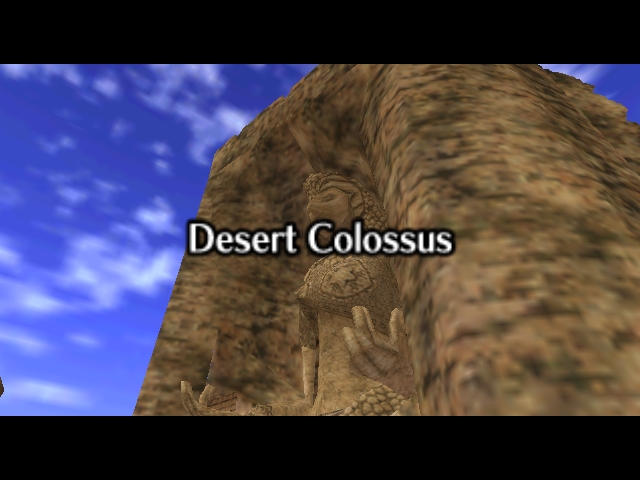
    anyone know how to do this? OoT Hi-res texture + Widescreen

    http://strategywiki.org/wiki/File:Ze...s_Colossus.jpg

    on that wiki site, there is this picture


    it shows hi res textures, but it is also in Widescreen!


    Does anyone know how to do this? with the pj64 emulator, i know how to get widescreen, but i dont know of any plugin that does true widescreen and hi res textures.

    • Advertising

      advertising
      EmuTalk.net
      has no influence
      on the ads that
      are displayed


  2. #2
    EmuTalk Member Craig R.'s Avatar
    Join Date
    Apr 2009
    Posts
    28
    nvm, delete this post

  3. #3
    EmuTalk Member jmf145's Avatar
    Join Date
    Mar 2006
    Posts
    57
    It's called cropping:
    Last edited by jmf145; May 9th, 2009 at 00:32.

  4. #4
    Double 0 Reject Xenobond's Avatar
    Join Date
    Jul 2006
    Location
    Las Vegas, NV
    Posts
    124
    Yeah, I just cropped a screenshot I took. Added the bloom in Photoshop, too.

  5. #5
    EmuTalk Member
    Join Date
    May 2009
    Posts
    4
    argh.

  6. #6
    EmuTalk Member mode7's Avatar
    Join Date
    Jun 2006
    Location
    Nuremberg
    Posts
    477
    It is possible to have real widescreen + hires texts with glide64

  7. #7
    Just a Jupi. Jupiter's Avatar
    Join Date
    Aug 2002
    Posts
    74
    It would require a camera hack for individual games to alter the aspect ratio. Not a fun task.
    baka^ni

  8. #8
    EmuTalk Member jmf145's Avatar
    Join Date
    Mar 2006
    Posts
    57
    Quote Originally Posted by Jupiter View Post
    It would require a camera hack for individual games to alter the aspect ratio. Not a fun task.
    Well the hack exists in PJ64 1.6 and works well with most games. So I don't think that Jabo spent time getting the wide screen hack to work with individual games.

    EDIT:
    Thread about this:
    http://emutalk.net/showthread.php?t=41211
    How to do wide screen:
    http://emutalk.net/attachment.php?at...4&d=1182894503

    EDIT 2:
    Found a list of games that support wide screen via in game options:
    * Banjo-Tooie
    * Donkey Kong 64
    * GoldenEye 007
    * Jet Force Gemini
    * Mickey's Speedway USA
    * Perfect Dark
    http://www.mobygames.com/browse/games/n64/tic,2/
    Last edited by jmf145; May 9th, 2009 at 20:49.

  9. #9
    EmuTalk Member jmf145's Avatar
    Join Date
    Mar 2006
    Posts
    57
    BTW does anyone have a cheat that moves the HUD to the edges of the screen for OoT?

  10. #10
    EmuTalk Member
    Join Date
    May 2009
    Posts
    20
    Short of Project64 1.7 and its graphics plugin, is there any way to have both true, FOV-adjusted widescreen as well as replacement textures? Glide64's recent releases support widescreen, but only in the sense that selecting a widescreen resolution will pillarbox the image to maintain a proper aspect ratio rather than stretching it.

    For those of you with legitimate copies of Project64 1.7, does widescreen work with Rice format texture packs?

Posting Permissions

  • You may not post new threads
  • You may not post replies
  • You may not post attachments
  • You may not edit your posts
  •