
You are using an out of date browser. It may not display this or other websites correctly.
You should upgrade or use an alternative browser.
You should upgrade or use an alternative browser.
getting a CDI file to run
- Thread starter Yamaraja
- Start date


Ma Chao
Proud Warrior
Dunno about Joy2Key. Xpadder just download any of the controller images (like the DC one  ) and create a .xpaddercontroller using this image and place your control buttons, D-pad and analog stick, on where it should be on a DC controller. Then just config each button, D-pad and analog stick for the default keyboard configuration of nullDC.
If you still can't get it to work, you can use this tutorial: http://www.1emulation.com/forums/lofiversion/index.php/t21675.html
Although I had some problems with his custom .xpaddercontroller.
) and create a .xpaddercontroller using this image and place your control buttons, D-pad and analog stick, on where it should be on a DC controller. Then just config each button, D-pad and analog stick for the default keyboard configuration of nullDC.If you still can't get it to work, you can use this tutorial: http://www.1emulation.com/forums/lofiversion/index.php/t21675.html
Although I had some problems with his custom .xpaddercontroller.
Last edited:

JKKDARK
New member
one last thing, does it have 2 player? cause I'm having trouble with that.
yes 4 player support. what problem do you have ?
- Thread Starter
- #11
ah shit, this is gonna take a while.
well I have three different controllers plugged in but they all control player 1 and the emulator thinks only one is plugged in. I have an adapter that lets you use the ps2 controller on your pc and you can have 2 controllers plugged into it. and I have an old pc controller I put into the 2nd usb port to see if that worked but all 3 controllers control player 1. and under config, it only shows "config for player 1". here's a picture.
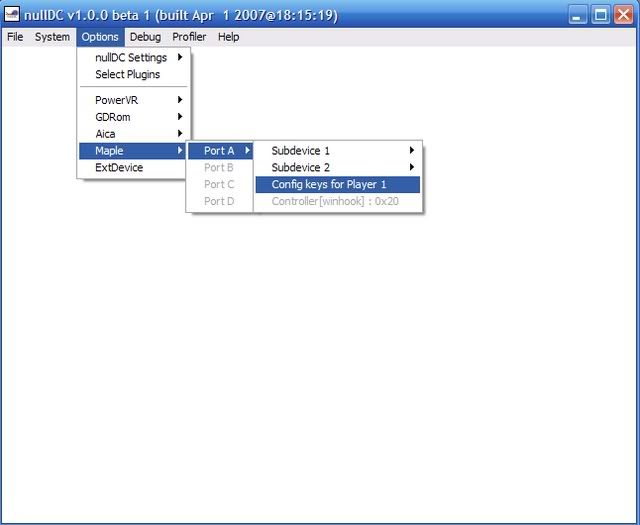
well I have three different controllers plugged in but they all control player 1 and the emulator thinks only one is plugged in. I have an adapter that lets you use the ps2 controller on your pc and you can have 2 controllers plugged into it. and I have an old pc controller I put into the 2nd usb port to see if that worked but all 3 controllers control player 1. and under config, it only shows "config for player 1". here's a picture.
- Thread Starter
- #16
man, there's another problem. all of a sudden it's saying it can't load Soul Calibur data and check the VMU. I didn't change anything that I remember, the only thing I did was go into xpadder and set controller settings for player 2 and saved them. so I didn't do anything in the emu. any idea why it would say that all of a sudden?