Results 1 to 7 of 7
  1. #1
    EmuTalk Member
    Join Date
    Aug 2005
    Posts
    74

    Extracting palettes from a PSX game.

    How is it done?

    I know palettes can be extracted from save states for emulators for the SNES, Genesis, etc., with Tile Molester, but I don't know how it can be done with a PSX game.


    I'm trying to extact the palette from Tomb Raider 2 for the PlayStation.

    From what info I've read in beginner's text files, I need to run PCSXTrace and hit F11 when the level starts to begin tracing, then hit F11 to stop. Then I would need to load the trace.log that PCSXTrace made in a text program, and look for something in there that refers to the palette (I don't know what to even look for). Am I correct in this reasoning?

    Also, PCSXTrace won't run on my computer. It keeps saying "Could not load CDR Plugin" and "Configuration not OK!" even though I am using the same plugins I use for epsxe. Is there any other PSX emulator with a trace and logging function that I can use?

    Or is there an even simpler way of doing this without having to trace the game's code?
    Last edited by sb iq; October 21st, 2006 at 10:49.


    • Advertising

      advertising
      EmuTalk.net
      has no influence
      on the ads that
      are displayed


  2. #2
    Moderator Cyberman's Avatar
    Join Date
    Nov 2001
    Posts
    1,824
    Quote Originally Posted by sb iq View Post
    How is it done?

    I know palettes can be extracted from save states for emulators for the SNES, Genesis, etc., with Tile Molester, but I don't know how it can be done with a PSX game.

    I'm trying to extact the palette from Tomb Raider 2 for the PlayStation.

    From what info I've read in beginner's text files, I need to run PCSXTrace and hit F11 when the level starts to begin tracing, then hit F11 to stop. Then I would need to load the trace.log that PCSXTrace made in a text program, and look for something in there that refers to the palette (I don't know what to even look for). Am I correct in this reasoning?

    Also, PCSXTrace won't run on my computer. It keeps saying "Could not load CDR Plugin" and "Configuration not OK!" even though I am using the same plugins I use for epsxe. Is there any other PSX emulator with a trace and logging function that I can use?

    Or is there an even simpler way of doing this without having to trace the game's code?
    Well now that is an interesting question.

    How about using the Playstations VRAM to find the palette?

    In Final Fantasy 7/8/9 the palettes are loaded into VRAM, and are used to generate the background images from tile sets stored in TIM's.

    So if you want TR-2's palettes they are in VRAM

    Cyb
    Progress (n.):
    The process through which the Internet has evolved from smart people in front of dumb terminals to dumb people in front of smart terminals.
    -------------------------------------------------------------------
    Recursive (adj):
    see Recursive

  3. #3
    EmuTalk Member
    Join Date
    Aug 2005
    Posts
    74
    Hmmm. Thanks for the tip.

    How do I check the VRAM in epsxe? I'm not too familiar with PCSX.

    Also, I'm assuming once I do check the VRAM, it will all be in MIPS R3000 assembly code. I was never taught how to read assembly code. What should I be looking for?

    I was told that it was highly likely that PSX palette is in 256 color. This means 256*3=768 bytes. Also, in the PC version it starts at offset 04. These are probably the only clues I have in finding the palette at this point.
    Last edited by sb iq; October 22nd, 2006 at 00:01.

  4. #4
    EmuTalk Member
    Join Date
    Aug 2005
    Posts
    74
    Could I extract the palette by running epsxe, hitting F8 to make a screenshot, and using Paint Shop Pro to extract the palette from the screenshot?

    I also noticed that whenever I make a save state in epsxe, it also saves a seperate .PICT file. Could the palette be in there?

  5. #5
    Moderator Cyberman's Avatar
    Join Date
    Nov 2001
    Posts
    1,824
    It's not that simple,
    First VRAM is 1024x512 words in size.
    Second the palettes in the PS1 are 16 bits not 24 bits.
    1:MB 5:BLUE 5:GREEN 5:RED
    from MSB to LSB
    you have a few choices.
    1) modify Peops soft GPU to 1 display VRAM
    2) to dump VRAM to a file.

    you can then screen capture the palette (VRAM is displayed in 16 bit color so the colors will be correct when viewed in that mode).

    You will then need to EDIT the resulting BMP to get the correct palette.
    Also you need to be certain you are on palette page boundries.

    Cyb - it will make more sense if you view VRAM (ALT key under windows I believe using this plugin).
    Progress (n.):
    The process through which the Internet has evolved from smart people in front of dumb terminals to dumb people in front of smart terminals.
    -------------------------------------------------------------------
    Recursive (adj):
    see Recursive

  6. #6
    EmuTalk Member
    Join Date
    Aug 2005
    Posts
    74
    How should I edit the BMP if I decide to extract the palette from a screen capture (I'm much more eager to get this from a screen capture than digging through ASM code and then figuring out what hex address in RAM the palette is located, )? I am using Jasc Paint Shop Pro 9.

    And if I decide to look at the VRAM, what should I look for? Because it will all be in ASM, what ASM code should I be looking for that might hint that it is a palette?

    And if the palette is 16 bits, how many bytes is that in the file? Can you explain the math behind that (sorry, I'm still a newbie)?

    I also read in a beginner's text that I should use a program called UltraEdit to view the trace logs. Unfortunately, UltraEdit isn't free. Can I just use notepad or another free program instead?
    Last edited by sb iq; October 24th, 2006 at 23:21.

  7. #7
    EmuTalk Member
    Join Date
    Aug 2005
    Posts
    74
    I just tested out Peops soft GPU with epsxe. There are my settings:

    Plugin: P.E.Op.S. Soft Driver 1.1.17
    Author: Pete Bernert and the P.E.Op.S. team

    Resolution/Color:
    - 1024x768 Fullscreen - [32 Bit]
    Stretch mode: 0
    Dither mode: 1

    Framerate:
    - FPS limit: on
    - Frame skipping: off
    - FPS limit: Auto

    Misc:
    - Scanlines: disabled
    - Game fixes: off [00000000]

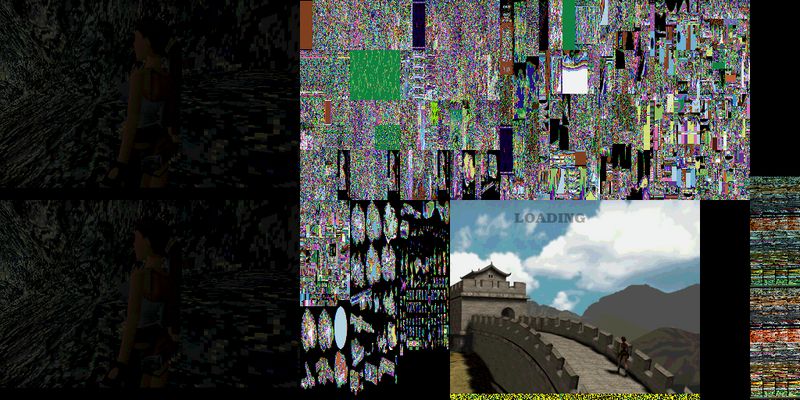
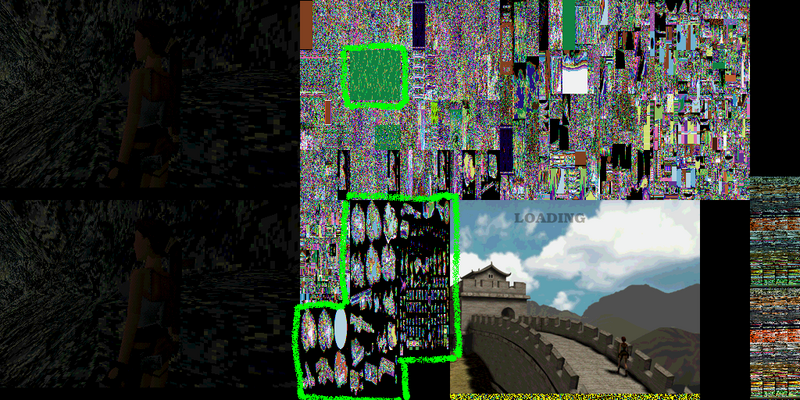
    And when I took a screen capture of what was in the VRAM, I got this (photobucket shrank it to 800 x 600 btw):


    Right off the bat I recognized familiar texture shapes. They are highlighted in this picture in neon green spray paint:


    My question now is, how do I begin extracting the palette now? I am wondering if all I need to do now is cut out the textures I see into a seperate .bmp file, and use Paint Shop Pro to extract the palette. Am I right?

Similar Threads

  1. free brower games LIST
    By Vandale2006 in forum Gaming
    Replies: 7
    Last Post: July 20th, 2008, 17:28
  2. Game freezes in Chankast!! help....
    By DavIng in forum Chankast
    Replies: 0
    Last Post: June 23rd, 2004, 18:20
  3. PC: Hitman 2: Silent Assassin
    By DuDe in forum Emulation64.com Reviews
    Replies: 6
    Last Post: December 15th, 2002, 04:26
  4. GC: Star Wars - Rogue Squadron 2
    By Stalkid64 in forum Emulation64.com Reviews
    Replies: 1
    Last Post: December 10th, 2002, 19:56

Posting Permissions

  • You may not post new threads
  • You may not post replies
  • You may not post attachments
  • You may not edit your posts
  •