View Full Version : Real shaders are here. Cel & Bloom
cdiddy7
February 21st, 2008, 06:37
I Know this is the hi res texture thread but it seems this would best fit here.
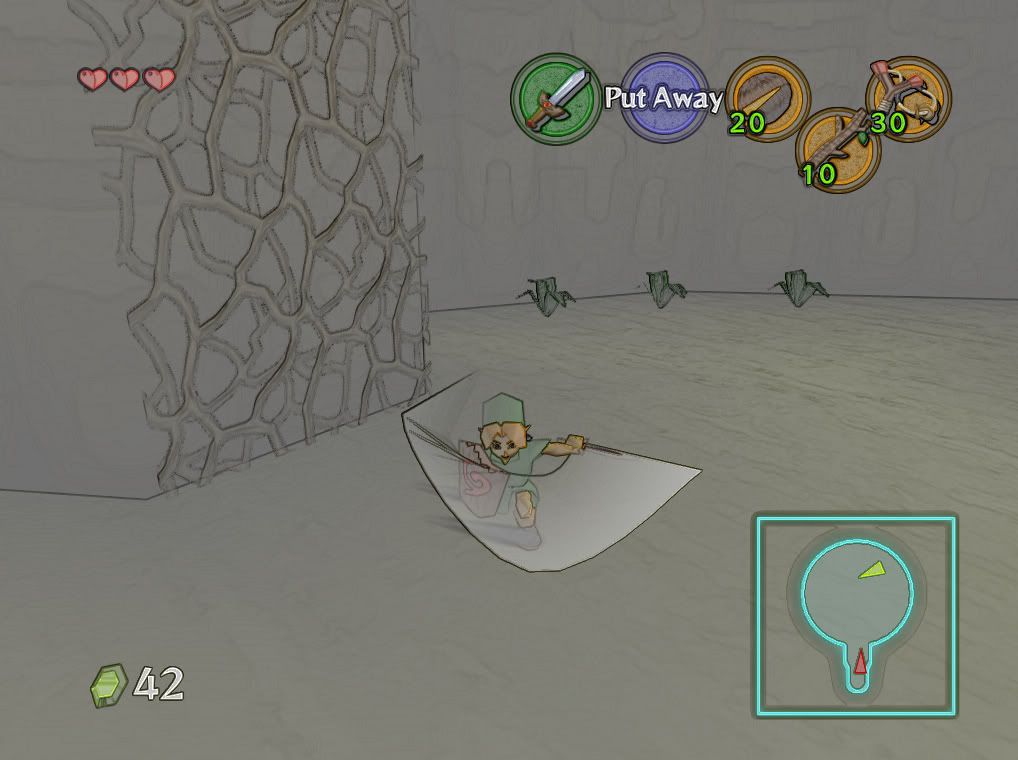
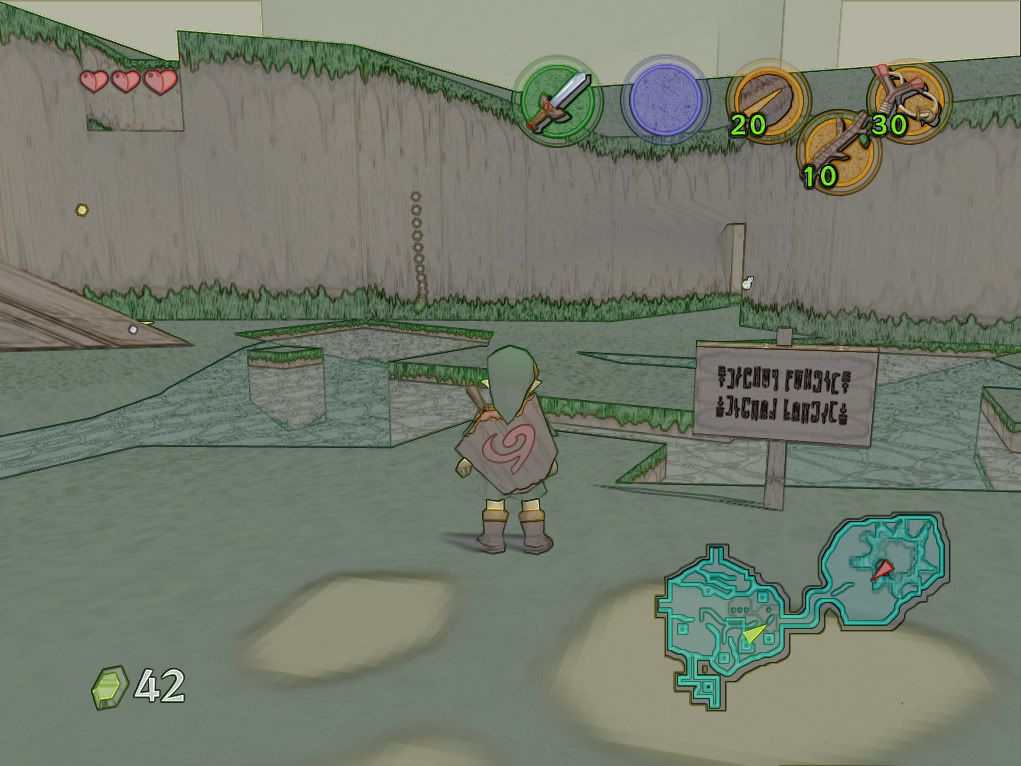
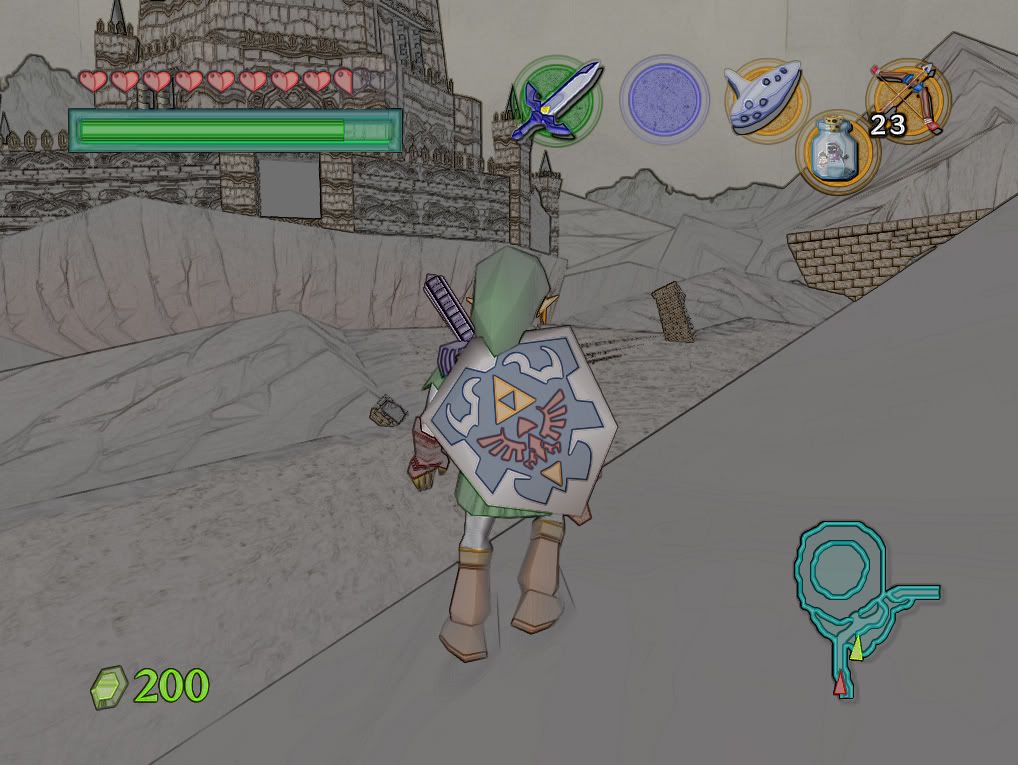
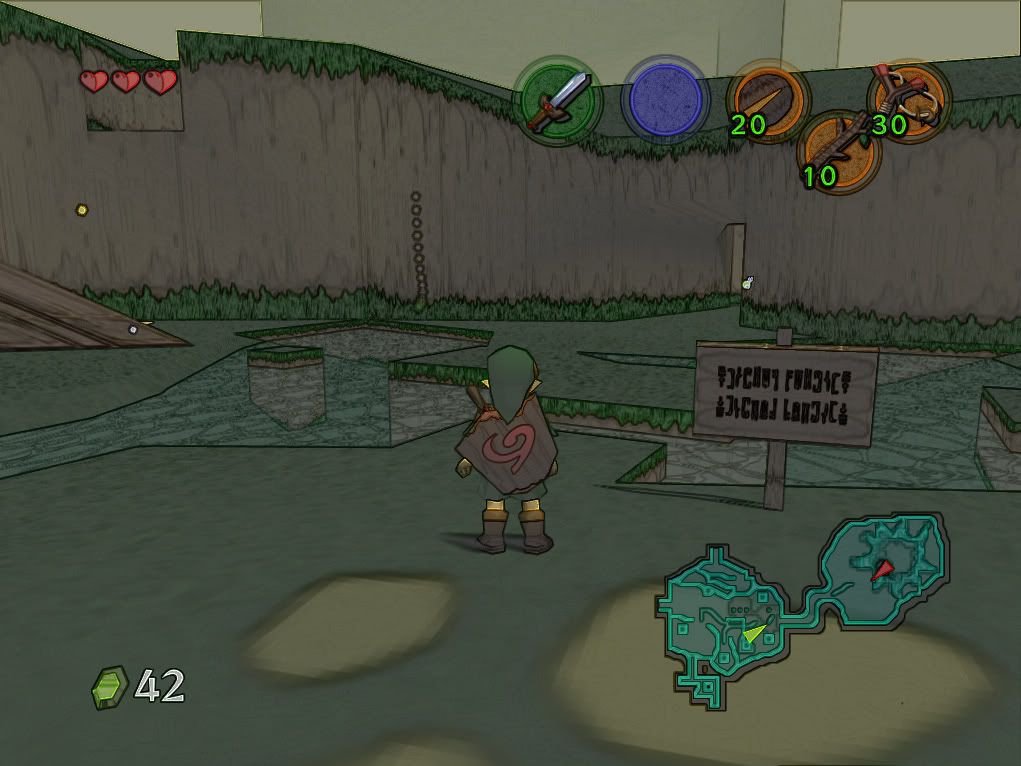
Here you guys might like this. It's not in the greatest shape but It's a start. I concocted this shader when I was working on a bloom shader mod for Resident Evil 4. Its based off of Timeslips DLL for Oblivion. I can confirm it works with Project 1.7 and mudlords rice 6.1.3. To Install place in the same folder as the project64.exe . Prssing the the + on the number pad toggles the effect on and off.
UPDATE...
I've updated the shader to look a bit more vivid and some of the really dark spots aren't so dark anymore feel free to give suggestions.
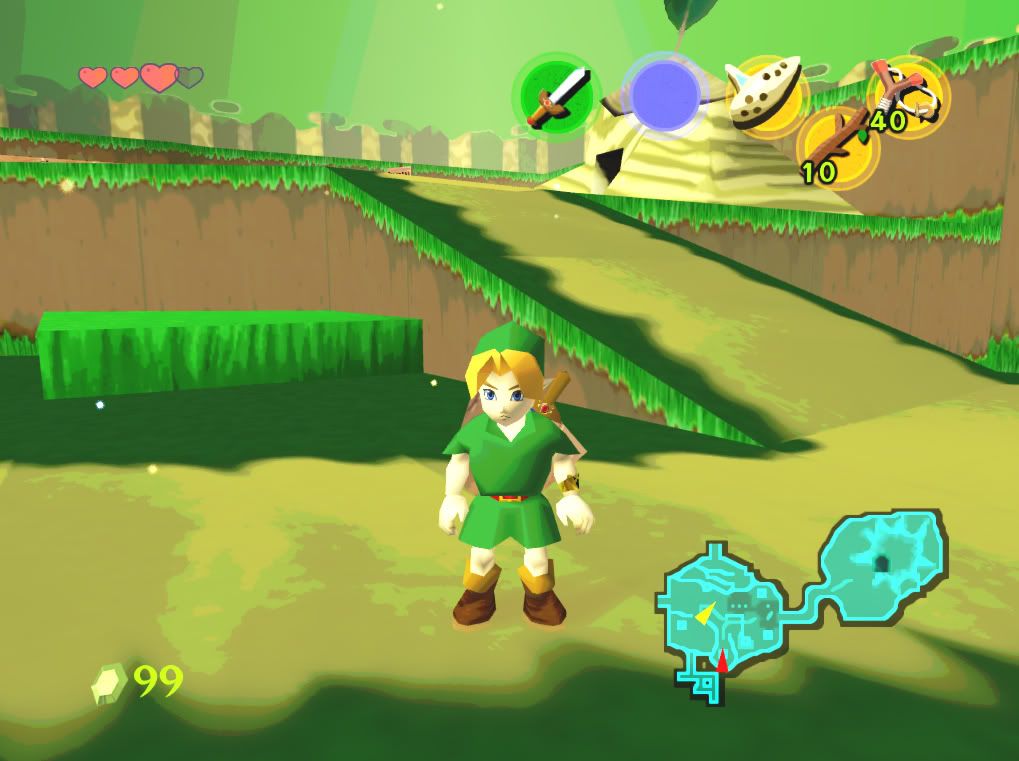
http://i184.photobucket.com/albums/x240/fugdunny/zzz37.jpg
DOWNLOAD: http://files.filefront.com/vividrar/;9716395;/fileinfo.html
.
.
.
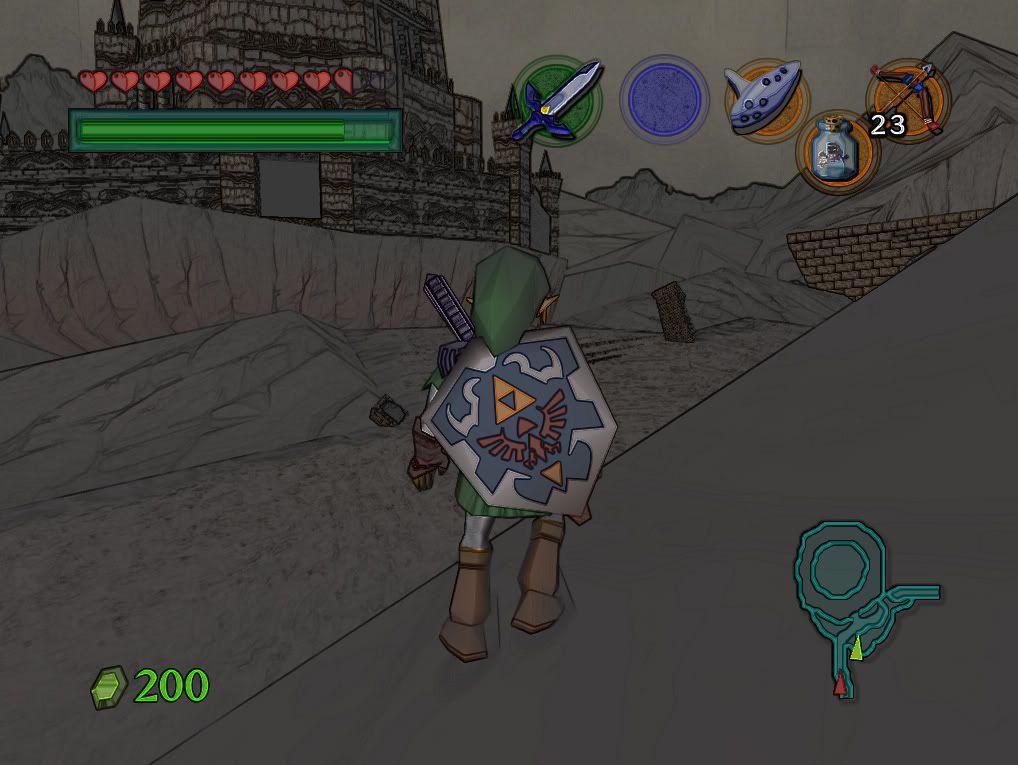
DOWNLOAD; (Outline, not the greatest)
http://files.filefront.com/Very+Bata+Celrar/;9673733;/fileinfo.html
http://i184.photobucket.com/albums/x240/fugdunny/zz2.jpg
http://i184.photobucket.com/albums/x240/fugdunny/zz3.jpg
http://i184.photobucket.com/albums/x240/fugdunny/zz8.jpg
You can make this affect more bearable by changing the the brightness and gamma etc. in nvidia control panel like these settings here.
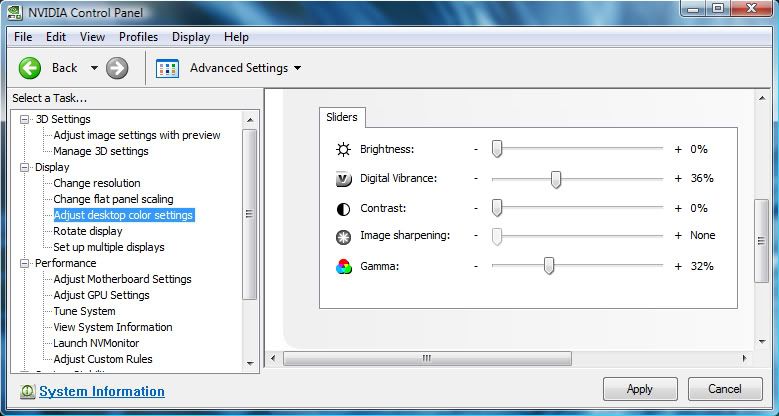
http://i184.photobucket.com/albums/x240/fugdunny/zzn.jpg
so they look more like this (these pictures brightness and contrast have been edited quickly in photoshop so the control panel tweaks look better)
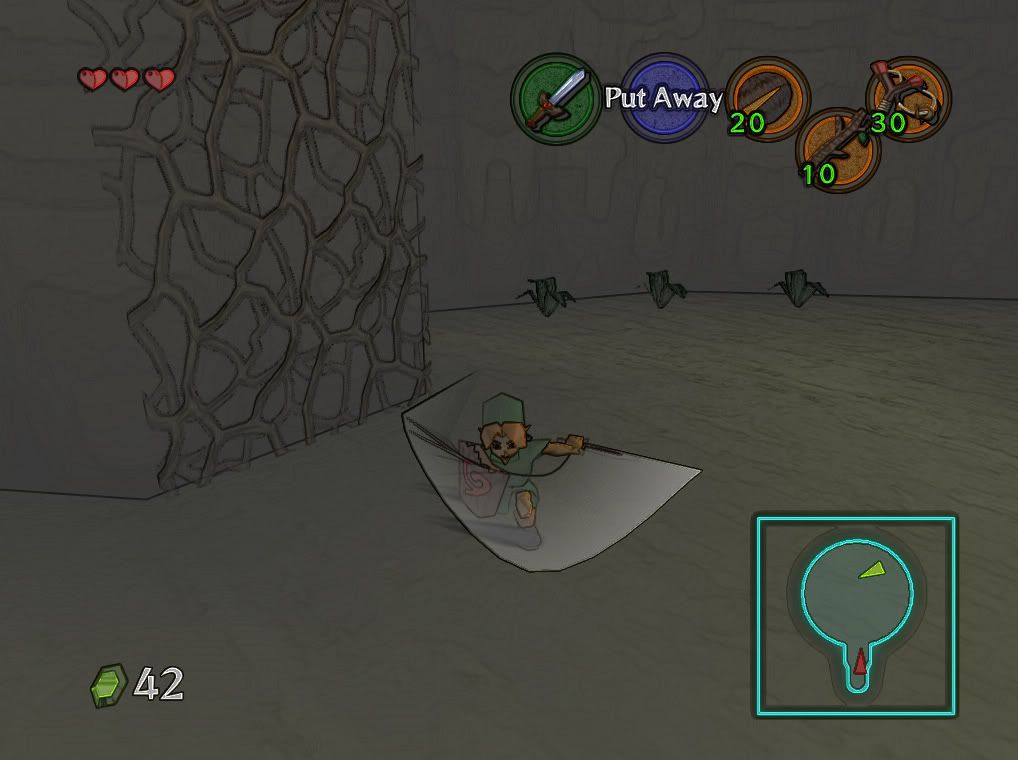
http://i184.photobucket.com/albums/x240/fugdunny/zz2col.jpg
http://i184.photobucket.com/albums/x240/fugdunny/zz3col.jpg
http://i184.photobucket.com/albums/x240/fugdunny/zz8col.jpg
DOWNLOAD;
http://files.filefront.com/Very+Bata+Celrar/;9673733;/fileinfo.html
If anyone who knows anything about editing shaders whants to edit these files for the beter your more than welcome to make your own versions if you like. I will be busy Impoving the bloom shader.
If you want the bloom shader here it is http://files.filefront.com/RE+BloomRC22rar/;9448621;/fileinfo.html
Other versions can be found here http://z6.invisionfree.com/Resident_Evil_4_PC/index.php?showtopic=2236&st=0
MasterPhW
February 21st, 2008, 08:46
Nice to see that!
It's great to see some good new ideas!
Looking forward to updates and more shaders!
mudlord
February 21st, 2008, 12:37
Nice discovery. Is this a code hack? If so, can you send the source files my way please, so I can implement these into the renderers?
If not, you just saved me loads of issues. I have been grappling with the best way to compile shaders on offscreen surfaces for ages, and yet you bet me. So well done for this approach.
Now one more question, is the code explicitly tied into the bloom shader? Because, I have thoughts on coding more shaders for this. :)
EDIT: Found the authors site, and he even gave out the source code!!!
Thanks for bringing this mod to my attention!
NightK
February 21st, 2008, 13:22
Great :D
Although I Can't make it work, for some reason, I hope to see a more colorfull version in the future, and hope that this helps mudlord :D
mudlord
February 21st, 2008, 13:38
Works brilliantly here with the 6.1.3 DX9 plugin....
NightK
February 21st, 2008, 13:47
I press +, and n-rage plugin changes the pak to memory pak, I disabled n-rage plugin and tried it again and nothing happened maybe I'm doing something wrong :P
mudlord
February 21st, 2008, 14:53
Man this is annoying...
Sometimes the shaders sporadically work, sometimes they don't..Which is a major shame, as I made did some mods to the fullscreen effect DLL, so that it works on other programs than Oblivion (so it allows for greyscale effects). But unfortunately I am unable to test, due to the original DLL being quite erratic in its function...
Oh well.
EmuFan
February 21st, 2008, 15:06
Nice one. Got no effect at first, but itīs working nicely now.
EDIT: Mud, the full screen issue in rice, you know, when it crashes when you try to exit full screen..Is there any chance to fix that? Or is it something i forgot to check in the configuration? It has been that way as long as i can remember..
Double edit: Try this with Paper Mario, itīs not bad...Besides the usual flickering issue.
Triple edit: Double posters, use the edit button!
Terranigma
February 21st, 2008, 20:16
Very cool! I saw your RE4 bloom mod too!
Agozer
February 21st, 2008, 20:38
That Resident Evil 4 Bloom shader mod looks sweet as candy.
cdiddy7
February 21st, 2008, 21:12
Mudlord if you look at the (cel) fx file you'll see that this shader is totally ghetto rigged there is allot of useless junk in there like the bright pass and bloom code which can be deleted, I kind of just whipped this up quick. The edge detect shader isn't that great ether I modified it the best I could but other shader passes don't like to work with it. I've been Looking for a better edge detect shader for while now and haven't had much luck. As far as the source code go's modifying and rebuilding it has also been tricky. The current DLL only seems to support two passes and seems to have a hard time using long assembly passes.
I notice for me at least that this shader runs Mario with just a black and white edge detect effect, so some games handle the effect differently.
Also this might interest you, I have nothing to do with it but its a very nice Bloom effect for opengl. It works in opengl mode but there are a few problems you might want to check it out http://www.madabouthats.org/projects/cgshader
mudlord
February 21st, 2008, 22:56
Thanks for the link.
I have been having severe troubles getting your mod to work at all, and even Timeslip's sources, even though my hardware supports Shader Model 4.0..
Anyway's if anyone could get this (http://vba-m.ngemu.com/personalfiles/genericshader.rar) DLL to work, I would love to hear it.
cdiddy7
February 21st, 2008, 23:13
That DLL looks like the simple black&white shader if it is, it only works for oblivion and has very limited functionality.
The DLL I posted should work for zelda oot using project64 1.7 (and probably 1.6) and ver. 6.1.3 of your plugin. and I also have a DirectX10 card, 8800GTS. I'll look closer at the dll you posted and see if i can do anything with it.;)
mudlord
February 21st, 2008, 23:17
The DLL I posted should work for zelda oot using project64 1.7
Thanks for the tip...I'll get 1.7 from the pj64-emu.com beta section then and try it out...
mudlord
February 21st, 2008, 23:20
That DLL looks like the simple black&white shader if it is, it only works for oblivion and has very limited functionality.
Main thing, was I removed the checks for Oblivion, so it could have the potential of working on other DX9 apps...
My main objective is to whip up something that allows for different shader effects, like nightvision, B/W, sepia and other things....:)..So far, its not going well, since I can't get your original mod to work. Though, once I get it working well, I might then be able to test out the DLL more thoroughly and add more shaders...
mudlord
February 21st, 2008, 23:46
And confirmed. Shaders in 1.7 work fine, with your mod...
cdiddy7
February 21st, 2008, 23:58
You should look into the Standard version at the top of Timeslips page http://timeslip.chorrol.com/FakeHDRDownload.html and see if you can get that up and working it should give you more room to work with if you can.
mudlord
February 22nd, 2008, 01:10
The current DLL only seems to support two passes and seems to have a hard time using long assembly passes.
I looked, and it seemed like it just supported Oblivion, as it uses a binary patcher to patch a specific offset so it enforces use of that DLL. It would be possible just to make the DLL hook the Project64 process, but then thats restricting things...
In other news, I fixed the multiple passes issue. The HDR shader now works great . :) So, shaders with more than 2 passes should theorectically work, but I haven't checked.
mudlord
February 22nd, 2008, 01:35
The edge detect shader isn't that great ether I modified it the best I could but other shader passes don't like to work with it. I've been Looking for a better edge detect shader for while now and haven't had much luck.
Tried using a Sobel edge detection shader?
mudlord
February 22nd, 2008, 01:39
Link for updated shader DLL : http://vba-m.ngemu.com/personalfiles/mudshade.rar
mudlord
February 22nd, 2008, 01:56
Mud, the full screen issue in rice, you know, when it crashes when you try to exit full screen..Is there any chance to fix that? Or is it something i forgot to check in the configuration? It has been that way as long as i can remember..
Yeah EmuFan I am well aware of it. I tried to debug what happens, but PJ64 even kills the debugger when it crashes, making it super hard to test & fix. Although, I have a idea with this code, so you might not have to use 1.7, IF my plan works....
mudlord
February 22nd, 2008, 02:44
Seems now the DLL works fine even with arbitrary shaders....:matrix:
Here is a simple two pass multiblending shader...
http://www.sendspace.com/file/o5qlu7
mudlord
February 22nd, 2008, 03:27
Got rid of all useless cel shading code:
//These variables will get set automatically
texture tex1;
texture tex2;
float2 rcpres;
sampler s0 = sampler_state { texture = <tex1>; };
//Use these to modify the behaviour of the dll
int ToggleKey=107;
float2 PixelKernel[6] =
{
{ 1, 0.5},
{0.5, 1},
{ 1, 0.5},
{ 0.5, -1},
{-1, 0.5},
{ 0.5, -1}
};
float4 ColourPass( in float2 Tex : TEXCOORD0 ) : COLOR0
{
float4 color = tex2D( s0, Tex );
color.a = 1;
return color;
}
float3 LuminanceConv = { -0.2125f, -0.7154f, -0.0721f };
float4 PostProcessPS(in float2 Tex : TEXCOORD0 ) : COLOR0
{
float4 Orig = tex2D( s0, Tex );
float4 Sum = 0;
for( int i = 0; i < 6; i++ )
Sum += ( abs( Orig - tex2D( s0, Tex + (PixelKernel[i]*rcpres) ) ) - 0.5f ) * 1.2 + 0.5f;
return saturate( dot( LuminanceConv, Sum ) ) * 1.1;
}
Technique T0
{
pass p0 { PixelShader = compile ps_2_0 ColourPass(); }
pass p1
{
PixelShader = compile ps_2_0 PostProcessPS();
}
}
There's the optimized version.
mudlord
February 22nd, 2008, 04:45
Finally had time to write some shaders...
http://vba-m.ngemu.com/personalfiles/mudshadepack.rar
Contains:
* Colour shaders to change the screen to be overall red/green/blue
* A black and white shader
* A emboss shader
* A sharpening shader
* A blur shader
* A modulating wave shader
* A photo negative (inverted) colour shader
* A striped shader
Enjoy..
MasterPhW
February 22nd, 2008, 09:43
Finally had time to write some shaders...
http://vba-m.ngemu.com/personalfiles/mudshadepack.rar
Contains:
* Colour shaders to change the screen to be overall red/green/blue
* A black and white shader
* A emboss shader
* A sharpening shader
* A blur shader
* A modulating wave shader
* A photo negative (inverted) colour shader
* A striped shader
Enjoy..
Great mudlord, keep it up! :)
NightK
February 22nd, 2008, 15:14
I'd like to try it but for some reason I can't make it work, can someone explain to me how?
Like a tutorial for dummies :P
Because everyone is achieving it but me...
EmuFan
February 22nd, 2008, 15:15
mud, you are on FIRE today! Keep it up!
Terranigma
February 22nd, 2008, 20:46
Anyone have some screens with bloom? I'd like to see what it looks like in an N64 game.
Ryuran
February 22nd, 2008, 20:58
Nice work Mudlord !!! The original shaders didn't work for me, but the last files you've posted works great !!!
http://xs124.xs.to/xs124/08085/mudlord1351.jpg
http://xs124.xs.to/xs124/08085/mudlord2280.jpg
http://xs124.xs.to/xs124/08085/mudlord3814.jpg
http://xs124.xs.to/xs124/08085/mudlord4932.jpg
http://xs124.xs.to/xs124/08085/mudlord5591.jpg
http://xs124.xs.to/xs124/08085/mudlord6849.jpg
Project64 1.7
Mudlord's Rice Video 6.1.3
MudShaderPack
Geforce 6150 onboard :(
HDR didn't work, probably because my onboard videocard.
This Bloom effect is from cgshader:
http://xs124.xs.to/xs124/08085/cgshader969.jpg
http://xs124.xs.to/xs124/08085/cgshader2634.jpg
Terranigma, just download MudShaderPack and extract d3d9.dll and fakehdr.fx (each effect is in a different folder, you can activate one at a time) to the same folder that Project64.exe is in.
cdiddy7
February 22nd, 2008, 22:21
;) Edited to next page >
Zane93
February 22nd, 2008, 22:41
I'm having trouble, I know this prbably only works with 1.7 but if it works with 1.6 I need to know how, but if it doesnt does anyone have a bloom filter that works?
mudlord
February 22nd, 2008, 22:46
EmuFan, if you are a beta tester of PJ64, I found a alternative solution to your issue.
Try build 46...Fullscreen reses work perfectly with my plugin with that. And shaders work fine too.
mudlord
February 22nd, 2008, 22:47
but if it doesnt does anyone have a bloom filter that works?
I've been experimenting with coding a bloom shader...
_Zack_
February 22nd, 2008, 23:01
Nice work mudlord :D
Exciting stuff :)
cdiddy7
February 22nd, 2008, 23:34
Check this out its kind of crazy anima style.
http://i184.photobucket.com/albums/x240/fugdunny/zzzz12.jpg
use these settings
http://i184.photobucket.com/albums/x240/fugdunny/zzz4.jpg
so it doesnt look like this.
http://i184.photobucket.com/albums/x240/fugdunny/zzzz1.jpg
Download:
http://files.filefront.com/anim+stylerar/;9690730;/fileinfo.html
(fixed it)
I used edge detect with bright pass mixed with black&white shader to try and mimic ingame cell lighting through postprocessing it kind of has a stylish effect.
EmuFan
February 23rd, 2008, 01:30
EmuFan, if you are a beta tester of PJ64, I found a alternative solution to your issue.
Try build 46...Fullscreen reses work perfectly with my plugin with that. And shaders work fine too.
Well, iīll be darn. Just checked it out. Exits fullscreen with NO PROBLEM. I am very relieved, that bug was a real pain, had to restart my computer every time. Thanks for notifying me, havenīt been at the site for ages.
cdiddy7
February 23rd, 2008, 23:56
oops, I uploaded the wrong file. got to many fakehdrs scattered all over my comp I'll fix the link in a min.
EDIT: ok fixed it. sorry bout that guys.
mudlord
February 24th, 2008, 00:31
Nice to see shaders with more than 2 passes working :) Seems then my fixes worked. I'm also working with byuu to get these shaders implemented with BSNES....
Djipi
February 24th, 2008, 12:48
I'm sure with work , we can made a perfect Cel chaded mod^^ .I hope you can do that to finishing Cel Mod.
AntonJ3000
February 24th, 2008, 13:46
I'm having trouble, I know this prbably only works with 1.7 but if it works with 1.6 I need to know how, but if it doesnt does anyone have a bloom filter that works?
I also use 1.6, Seems like it gives a Bloom-ish Effect with all kinda filters to Super Mario 64.
Terranigma
February 24th, 2008, 18:38
I only have JP64 1.6 as well, so I really don't have a chance in getting this to work.
BTW, who will be the first to attempt normal mapping on the N64? :drool:
Ryuran
February 25th, 2008, 01:35
It would be nice to see the cel shader plugin showing the correct colors ^^
mudlord
February 25th, 2008, 02:44
BTW, who will be the first to attempt normal mapping on the N64?
A bump map shader? Hmmmz...
It would be nice to see the cel shader plugin showing the correct colors ^^
Well, if you are having issues with the shader, why not edit it?
cdiddy7
February 25th, 2008, 04:00
It's gettin a little better ;)
http://i184.photobucket.com/albums/x240/fugdunny/zzzzzz4.jpg
http://i184.photobucket.com/albums/x240/fugdunny/zzzzzg.jpg
http://i184.photobucket.com/albums/x240/fugdunny/zzzzzz4org.jpg
Damn I need a better edge detect shader so i can get rid of the milky foggy tone :crazy: . does anyone know of a good simple Sobel shader?
It would be nice to see the cel shader plugin showing the correct colors ^^
lol gee your welcome for the shader , this project just got started, just experimenting there Ryuran.
mudlord
February 25th, 2008, 05:29
http://vba-m.ngemu.com/personalfiles/shaderexample.zip
There's a example of a Sobel edge detection shader...
Zane93
February 25th, 2008, 21:52
Mudlord I have your plugin, will this stuff work with It?
Twilight_hero
February 25th, 2008, 23:22
sorry to bother, but i did what you said and when ever i open the rom, pj64 1.7 just closes
Terranigma
February 26th, 2008, 17:37
A bump map shader? Hmmmz...
Not the simple height map version, I'm talking about the more advance version generated from a detailed model. Although it would be pretty hard for those of use without powerful machines to render the high detailed models. I did see another break through where you can take a 2D picture and create a normal map from that.
cdiddy7
February 26th, 2008, 20:47
alright heres the shader without the edge detect
http://i184.photobucket.com/albums/x240/fugdunny/zzz33.jpg
http://i184.photobucket.com/albums/x240/fugdunny/zzz34.jpg
Download: http://files.filefront.com/No+outlinerar/;9710066;/fileinfo.html
.
.
.
.
.
http://vba-m.ngemu.com/personalfiles/shaderexample.zip
There's a example of a Sobel edge detection shader...
Thanks for the link, have you tested this with the DLL?
_Zack_
February 26th, 2008, 21:13
alright heres the shader without the edge detect
http://i184.photobucket.com/albums/x240/fugdunny/zzz33.jpg
http://i184.photobucket.com/albums/x240/fugdunny/zzz34.jpg
Thanks for the link, have you tested this with the DLL?
Download Link?
cdiddy7
February 26th, 2008, 21:22
I'll have it up in a minute ;)
_Zack_
February 26th, 2008, 22:21
I'll have it up in a minute ;)
Thanks man
cdiddy7
February 26th, 2008, 22:30
Here is the Link
Download: http://files.filefront.com/No+outlinerar/;9710066;/fileinfo.html
Download; http://files.filefront.com/No+outline+Rrar/;9710114;/fileinfo.html (This one looks better with the Duku shield but adds more of a rusty color to curtain things but some might prefer it.)
Djipi
February 26th, 2008, 22:38
Great work ^^ but , it's really too dark ^^
http://img261.imageshack.us/img261/1370/thelegendofzelda6yn5.png (http://imageshack.us)
Too bad that cell effect is for all texture , wall and ground and others loo not good . But great work
_Zack_
February 26th, 2008, 22:43
Here is the Link
Download: http://files.filefront.com/No+outlinerar/;9710066;/fileinfo.html
Thanks mate :)
cdiddy7
February 26th, 2008, 22:46
Great work ^^ but , it's really too dark ^^
http://img261.imageshack.us/img261/1370/thelegendofzelda6yn5.png (http://imageshack.us)
Too bad that cell effect is for all texture , wall and ground and others loo not good . But great work
I can fix that. give me a few minutes
cdiddy7
February 26th, 2008, 23:14
Brighter and softer
Download; http://files.filefront.com/No+otln+Brighterrar/;9710255;/fileinfo.html
cdiddy7
February 26th, 2008, 23:47
screenshot
http://i184.photobucket.com/albums/x240/fugdunny/zzz35.jpg
mdtauk
February 27th, 2008, 01:19
I couldn't get this to work on PJ64 1.7
_Zack_
February 27th, 2008, 01:37
screenshot
http://i184.photobucket.com/albums/x240/fugdunny/zzz35.jpg
One word : WOW
Getting better by the minute.
Great stuff!
mudlord
February 27th, 2008, 03:18
I couldn't get this to work on PJ64 1.7
Okay, are you using my latest DX9 plugin?
That is essential for this to work.
I'm considering modding the plugin to use the same code as the DLL currently uses, but it might be tricky. Especially when texrects and fillrect commands need to be filtered. Which possibly means things can be filtered twice...Unless I modify the render loop...
pilm
February 27th, 2008, 10:10
screenshot
http://i184.photobucket.com/albums/x240/fugdunny/zzz35.jpg
The celshaded screenshots look amazing !
The result is so good, we may start to consider what type of lightning we want to use in this shader. In the screenshot above, the range of color on Link clothes is linearly mapped maybe we could find a more cartoonish color mapping ? (I have in mind this white paper from Valve, explaining how they created characters shading in TF2 (http://www.valvesoftware.com/publications/2008/GDC2008_StylizationWithAPurpose_TF2.pdf) (pdf), from an artistic point of vue the interesting part is about the biased lighning term, which avoid a linear shading.)
mudlord
February 27th, 2008, 10:50
The result is so good, we may start to consider what type of lightning we want to use in this shader. In the screenshot above, the range of color on Link clothes is linearly mapped maybe we could find a more cartoonish color mapping ? (I have in mind this white paper from Valve, explaining how they created characters shading in TF2 (pdf), from an artistic point of vue the interesting part is about the biased lighning term, which avoid a linear shading.)
Orkin was experimenting with per-pixel lighting when he was doing math before he does the dot product calculations in his shaders...
Terranigma
February 27th, 2008, 20:18
Gorgeous, simply gorgeous. I think we found the next evolution to N64 emulation.
mongo51983
February 27th, 2008, 20:37
Is there a link to the plugins I need to get this to work?
cdiddy7
February 27th, 2008, 20:37
I've updated the shader to look a bit more vivid and some of the really dark spots aren't so dark anymore feel free to give suggestions.
http://i184.photobucket.com/albums/x240/fugdunny/zzz37.jpg
Download: http://files.filefront.com/vividrar/;9716395;/fileinfo.html
mongo51983
February 27th, 2008, 20:41
It's working now.
death--droid
February 29th, 2008, 09:33
damit i wish i have pj64 7.0
Soups
March 1st, 2008, 06:04
I'm SO desperate to get this to work, but it's just not cooperating! Can someone maybe post a checklist of plugins/files/whatever I need to get this to work? I have Mudlord's plugin as my graphics plugin, and I extracted everything from the OP into both my PJ 1.6 folder (I know it's been said I need 1.7, but I can't seem to find it anywhere without donating to the official PJ64 site), plus I extracted the files into the plugins folder JUST IN CASE. Still no dice. Any suggestions? Is PJ64 1.7 absolutely vital?
Terranigma
March 1st, 2008, 15:20
Yes, I think you have to have PJ64 1.7.
cdiddy7
March 1st, 2008, 19:19
Damita i wish i have pj's 7.0
I'm SO desperate to get this to work, but it's just not cooperating! Can someone maybe post a checklist of plug ins/files/whatever I need to get this to work? I have Mud lord's plugging as my graphics plugging, and I extracted everything from the OP into both my PK 1.6 folder (I know it's been said I need 1.7, but I can't seem to find it anywhere without donating to the official PJ'S site), plus I extracted the files into the plug ins folder JUST IN CASE. Still no dice. Any suggestions? Is PJ'S 1.7 absolutely vital?
Well... use your imagination the Internet is full of endless information you know :devil:. Where do you get your Roms? I can only guess. :pirate: ;)
ps. I do not condone piracy in any way.
Elite Knight
March 1st, 2008, 19:41
For the cel shadder i would add a smoth layer to make it like LOZ WW still ruff edges a tiny bit. Still amazzing work.
Also i cant get it to work either i followes the steps can u explain them in steps exp.
1. Install in dic
2. So on So forth
And add the whole file name leave out the file type so we can get it to work i dont understand a little to.
You probley dont even know what im saying.
Twilight_hero
March 1st, 2008, 20:21
I have extracted the dll and the fakehdr.fx to the project 64 directory and i have put on the Mudlord's Rice Video plugin Build 6.1.3- DX9, but everytime i load up the rom, it doesn't work, it just closes all of a sudden.
Soups
March 1st, 2008, 20:25
Well... use your imagination the Internet is full of endless information you know :devil:. Where do you get your Roms? I can only guess. :pirate: ;)
ps. I do not condone piracy in any way.
I love you.
But seriously, isn't 1.7 only in its beta stage? Is this the version I really NEED to use? Is that the only reason when I load up OoT and hit + on the number pad crazy shading/bloom crap doesn't explode onto my screen?
E: Finally got this working and it looks amazing!Too bad about the program crashing when leaving full-screen, though.
mudlord
March 1st, 2008, 21:05
Doesn't crash for me....
EmuFan knows why
cdiddy7
March 1st, 2008, 23:32
Color's getting a hell of a lot better no more poop brown all over the place. and now the textures aren't all corrupt in fact it now gives the allusion of bump mapping and dark areas look much better.
DOWNLOAD:
http://files.filefront.com/cel+likerar/;9737090;/fileinfo.html
http://i184.photobucket.com/albums/x240/fugdunny/zzz43.jpg
http://i184.photobucket.com/albums/x240/fugdunny/zzz4123.jpg
http://i184.photobucket.com/albums/x240/fugdunny/zzz42.jpg
DOWNLOAD:
http://files.filefront.com/cel+likerar/;9737090;/fileinfo.html
cdiddy7
March 2nd, 2008, 00:18
the link's up.
starfox5194
March 2nd, 2008, 00:24
hey am i retarted or is mudlord's rice plugin like impossible to find?
can somebody tell me what to google
cdiddy7
March 2nd, 2008, 00:34
here is a link. https://ricevideo.bountysource.com/
Edit again; never mind 6.1.3 comes with 6.1.4
cdiddy7
March 2nd, 2008, 03:32
Just tested with 1964, it works fine. Those who can"t find pj64 1.7 can use the 1964 emulator with muldlord rice 6.1.3 not 6.1.4
Mariowario130
March 2nd, 2008, 04:02
this doesn't work, if it does then how do I make it work. Pressing "+" isn't best solution for a button
EmuFan
March 2nd, 2008, 12:47
Works fine for me. Do it as written, use the correct plugin. Put it in the installation folder. How the hell can you miss?
Mariowario130
March 2nd, 2008, 17:06
I do what is said to do, but it just doesn't work for me. Is there a plugin setting I need to have with said plugin?
Big Robot Bill
March 2nd, 2008, 17:28
'Thought I'd join in on the craze of this shader not working. I load up 1964 with 6.1.3 DX9 and I keep getting the errors "Error to start video" and soon after "g_pRender is NULL," both coming from Mudlord's plugin. Both files for the shaders are in the root directory of 1964. PJ64 1.6 also fails to work (but it actually loads up the game, but pressing "+" doesn't do anything). I've tried the other versions of Mudlord's Rice and nothing seems to work. My graphics card is rather old, so that may be the problem. It is a nVida Riva TNT2 Model 64/Model 64 Pro HAL. It does have the latest drivers from the support site, though.
So, is my graphics card the problem or have I overlooked something?
cdiddy7
March 2nd, 2008, 19:11
^Yeah it looks like ur video card is the problem. u need a graphics card that supports pixel shader 2.0. It wouldn't work with PJ64 1.6 it only works with 1.7 or 1964.
I do what is said to do, but it just doesn't work for me. Is there a plugin setting I need to have with said plugin?
What is your video card? Does it support pixel shader 2.0?
mudlord
March 3rd, 2008, 02:15
It is a nVida Riva TNT2 Model 64/Model 64 Pro HAL
Your video card does not support HLSL or assembly style pixel shaders. At all. There's your issue. You'll get shaders working IF you severely upgrade your video card. A GeForce FX or upwards should be fine. A Radeon 9600 should work great.
X-Fi6
March 3rd, 2008, 05:55
Hmm, this isn't working for me either.
This is when I use your Rice Video 1.6.4 normal and DX9 versions, as well as Jabo's 1.7.
I put the d3dx9.dll file in the Project64 folder and I run PJ64 1.7, and when I start a game, when I press + on the number pad nothing happens--same with when I'm in fullscreen mode.
I'm using an ATI Radeon x1600 with the latest drivers, with Windows XP x64 and DirectX 9.
Any ideas? I highly doubt it's because I'm using x64 Windows...
mudlord
March 3rd, 2008, 06:19
The D3D9 patched DLL will only work with DX9 plugins and applications. Nothing else.
Which 1.7 builds have you tried?
shaoranmps
March 3rd, 2008, 07:50
i want to try this but every time a use it my screen go white i want to know if this have something to do with ma video card i have a ATi RADEON 9250
Mariowario130
March 3rd, 2008, 08:54
What is your video card? Does it support pixel shader 2.0?
yes my card supports it, however I'm having problems with it not working or with the plugin itself. I tried Project64 1.7 and 1964. Still the same things happen, nothing.
Ryuran
March 4th, 2008, 02:04
Cdiddy7's DLL (all versions) works fine with Majora's Mask, but I couldn't make it work with Ocarina of Time... Why does it happen? I'm using the same configuration for both games.
Edit: Nevermind...I switched to 800x600 and its working now.
Mariowario130
March 6th, 2008, 04:07
Edit: Nevermind...I switched to 800x600 and its working now.
ahh, so thats the problem. It works now
Noobnugget
March 7th, 2008, 08:31
Any suggestions? Is PJ64 1.7 absolutely vital?
No. Shaders work fine in 1.6 too.
jdsony
March 7th, 2008, 18:57
This is exciting. Looks like when I ditch my desktop I'll have to opt for a laptop with a half decent graphics card.
mamudi
March 8th, 2008, 10:58
Wow I am Really Amazed!
But I have a question Will it work with Djipi Celda Pack?
thnx for the great work
These 2 shots look great
http://xs124.xs.to/xs124/08085/cgshader969.jpg
http://i184.photobucket.com/albums/x240/fugdunny/zzz37.jpg
mudlord
March 8th, 2008, 11:02
Wow I am Really Amazed!
But I have a question Will it work with Djipi Celda Pack?
thnx for the great work
yes, it will work with any game.
Driscol
March 8th, 2008, 11:21
the bloom looks a bit over the top, is there any chance of a slightly duller version?
jdsony
March 9th, 2008, 22:06
I'm having a weird problem. I tried the Bloom and it worked fine but now when I try and replace it with one of the other effects it just gives me the Bloom one everytime. I copied over the shader with a couple different ones but it stays the same.
Ok the mudshader pack they all work so the issue is just related to some of the other shaders people have been posting.
So they do actually work the results are just different than expected. It seems many of the FX slightly alter the colour output which is too bad when that's not the intention. Neat results though.
Angel O'Death
March 9th, 2008, 23:35
I'm having a strange issue. 6.1.3 DX9 won't show up in the selection box under options -> settings -> plugins. I've tried 1.7.0.46 and 1.7.0.55.
6.1.4 shows up and works fine.
Driscol
March 10th, 2008, 00:33
so no chance of a duller bloom
Marink
March 12th, 2008, 19:27
Hey, this seems really good. I only just found out about this scene but your doing some really awesome work. But it doen't work on the 6.1.4 plugin, so does anyone have a link to a 6.1.3 plugin.
Much appreciated.
MaxiPioche06
March 12th, 2008, 22:37
Hey, this seems really good. I only just found out about this scene but your doing some really awesome work. But it doen't work on the 6.1.4 plugin, so does anyone have a link to a 6.1.3 plugin.
Much appreciated.
Hi,
Rice's video 6.1.3 plugin is contained in Rice's release 6.1.4.
Download release from here : https://ricevideo.bountysource.com/downloads
Hope this helps.
mudlord
March 13th, 2008, 20:44
If people are interested, I'm planning a plugin update for the DX9 plugin. It will only support D3D9, so that the plugin will be smaller in size. I'm also planning on adding the same 32x texture support as in 6.1.3, so retexturers could use that. Though, to preserve compatibility with Glide64, its best that only 4x textures are used.
Ryuran
March 15th, 2008, 21:53
Great news !!!
I can hardly wait to use your new plugin :bouncy:
EmuFan
March 16th, 2008, 00:04
Thatīs great news indeed. 10 posts up: I LOVE the bloom effect in Majoras Mask.
Terranigma
March 16th, 2008, 15:25
If people are interested, I'm planning a plugin update for the DX9 plugin. It will only support D3D9, so that the plugin will be smaller in size. I'm also planning on adding the same 32x texture support as in 6.1.3, so retexturers could use that. Though, to preserve compatibility with Glide64, its best that only 4x textures are used.
I love you, man.
Oh, any chance the plugin will also have added supports for a few more games and improved support for existing games?
mudlord
March 16th, 2008, 21:44
love you, man.
Heheheh,
and I managed to patch everything to work on 1.6!!!
So shaders now work with PJ64 1.6, too
I need some testers to help me test with various emulators, anyone interested?
Linkage (http://vba-m.ngemu.com/personalfiles/hlslpatch.rar)
Driscol
March 17th, 2008, 05:20
ill try 1964
mudlord
March 17th, 2008, 06:10
Cool, thanks.
Gonetz
March 17th, 2008, 06:26
If people are interested, I'm planning a plugin update for the DX9 plugin. It will only support D3D9, so that the plugin will be smaller in size. I'm also planning on adding the same 32x texture support as in 6.1.3, so retexturers could use that. Though, to preserve compatibility with Glide64, its best that only 4x textures are used.
As Koolsmoky explained (http://www.emuxhaven.net/forums/showpost.php?p=77981&postcount=226), GlideHQ accepts arbitrary texture magnification ratio in the power of two numbers, x1, x2, x4, x8, x16, x32, x64, x128, ...
However, magnification ratio above x4 is just a useless waste of memory, IMO.
mudlord
March 17th, 2008, 06:34
GlideHQ accepts arbitrary texture magnification ratio in the power of two numbers, x1, x2, x4, x8, x16, x32, x64, x128, ...
Thanks for correcting me :)
However, magnification ratio above x4 is just a useless waste of memory, IMO.
I beg to differ. It could be used for very small textures to boost quality. Though, I agree that using them extensively is overkill. But I guess thats a choice the texture designers can make.
Driscol
March 17th, 2008, 07:15
oh srry i just found out my graphics card is reeeeeeeeeeeeeeeeaaaaaaaaaaaally old
rly srry.
mudlord
March 17th, 2008, 11:56
That sucks. Oh well, thanks for trying.
Unusual_Rex
March 17th, 2008, 22:09
Were can I download the latest bloom and Cel effects? There are so many links throughout the thread, which ones are the newest?
Edit: Okay, I found the stuff, but I can't get any of the effects to work! I press + on the NumPad, but nothing happens! I've got an nVidia Geforce 8800 so I doubt that it's the graphic card, any help?
Ryuran
March 18th, 2008, 23:05
You doesn't need to press "+", at least I didn't have to. If it's not working try changing the resolution. Some games only works at especific resolutions...
Doommarine23
March 19th, 2008, 04:16
Were can I download the latest bloom and Cel effects? There are so many links throughout the thread, which ones are the newest?
Edit: Okay, I found the stuff, but I can't get any of the effects to work! I press + on the NumPad, but nothing happens! I've got an nVidia Geforce 8800 so I doubt that it's the graphic card, any help?
Set your graphics mode to Pixel Shader.
PJ16
Configure Graphics plugin
DirectX
Combiner type drop down list: Pixel Shader
1964
Video Settings
Rest is the same.
Unusual_Rex
March 20th, 2008, 20:07
Dang it, I still can't get these working...
Doommarine23
March 20th, 2008, 21:59
Graphics card?
isidor
March 21st, 2008, 18:32
I'm having problems with filefront, can someone please upload the bloom shader on some other site?
MikiZora
March 25th, 2008, 20:25
I rather like the bloom cell it looks like how it would of looked during animated production oh and i cant help with file front it likes to always work for me
VinnyC
May 28th, 2008, 04:09
I have gotten this plugin to work correctly two times out of about a hundred tries. I am honestly clueless on how to get this thing to work. I have an 8800GTX with WinXP and the latest WHQL graphics driver.
I even edited the fakehdr.fx file to reference a different key on the keyboard with no luck. How on earth do I get this to work consistenly?!? I've tried different resolutions, rebooting, re-downloading the necessary files, I've tried setting the affinity of PJ64 to run on one core, setting the compiler mode to Pixel Shader along with DirectX (even though when it did work I did NOT have it on pixel shader mode), I've reinstalled pj64, set textures to 16bit, set textures to 32bit, turned Anisotropic filtering to 16x, turned Anisotropic filtering off, reinstalled the rice plugins, tried it with hi-res textures, regular textures, i've used pj64 1.6 and pj64 1.7....there has got to be a bug in one of these dll files or something. Is there any way to tell if it is even loading the d3d9.dll & fakehdr files correctly?:crazy:
Driscol
May 28th, 2008, 07:37
i THINK you have to use open gl.
Graxer
May 28th, 2008, 12:05
I have gotten this plugin to work correctly two times out of about a hundred tries.
I have exactly the same problem. It really annoys me!:(
death--droid
May 28th, 2008, 12:41
XD how does everyone have pj64 1.7 when there website donating = dead.
Oh yeah it depends how the plugin your using is built it might not accept the shaders as they can may or may not be programmed for the rendering engine it user as the can either use OpenGL or DirectX(D3D)
VinnyC
May 28th, 2008, 15:01
I'm using the Rice 6.1.3 DX9 plugin (the right one). Also, we get PJ64 1.7 from TORRENTS. It seems buggier than version 1.6 though. Anyways, I want this to work! Someone please fix it fix it fix it fix it!
EmuFan
May 28th, 2008, 17:23
XD how does everyone have pj64 1.7 when there website donating = dead.
Oh yeah it depends how the plugin your using is built it might not accept the shaders as they can may or may not be programmed for the rendering engine it user as the can either use OpenGL or DirectX(D3D)Itīs very simple. You only have to donate ONCE, and then you can get all the builds. Probably those who have it, donated a LONG time ago.
MasterPhW
May 28th, 2008, 18:00
Also, we get PJ64 1.7 from TORRENTS. It seems buggier than version 1.6 though. Anyways, I want this to work! Someone please fix it fix it fix it fix it!
Yeah, you can see what's you fault, do you? You download 1.7 from ILLEGAL sources, and it's just an old bugged and hacked release. That's it. So no support by anyone.
VinnyC
May 28th, 2008, 19:51
lol gee thanks. If Project 64 would open up their donation thing again, I would love to donate. I can't help it if they closed it for some reason. Also, the only reason i downloaded PJ64 1.7 is because i could not get the HDR to work with 1.6. Since it doesn't work with 1.7 either, I have already deleted it and am back to using 1.6
So if someone would kindly consider either giving step-by-step instructions on getting the HDR thing to work with version 1.6, or maybe figure out how to get it to load the fakehdr & d3d9.dll files that would be wonderfully helpful.
gitech
May 28th, 2008, 20:08
I checked out your flash comparison for OOT and I am impressed. I would like to know if I could do the same thing. What do I need and can it be done so that it would display here within a thread?
As for PJ64 1.7 I do not have it but I (like many others) would like to know what is going on with it as well. I hope it is not dead.
I noticed the authors were working on it specifically for Castlevania LOD at some point. I have put thousands of hours into my LOD hi-res pack and was hoping it may spur some new enthusiasm for making progress in the way of emulators and plugins...namely PJ64 1.7 and Mudlords/rice so the game could run without error and with all of the sound channels and no sound pops.
VinnyC
May 28th, 2008, 21:10
I checked out your flash comparison for OOT and I am impressed. I would like to know if I could do the same thing. What do I need and can it be done so that it would display here within a thread?
I'm glad you like it! If you have flash, you are more than welcome to try to do the same thing, however it wasn't as easy as you might hope. There was a lot of actionscripting involved to get everything working, and I don't think you would be able to post it in a thread.
I honestly would like to do another one of these comparison things myself using the HDR mod, hence why i'm so adamant about getting it to work. So... if anyone would like to help... that would be great!
EmuFan
May 29th, 2008, 12:55
I'm using the Rice 6.1.3 DX9 plugin (the right one). Also, we get PJ64 1.7 from TORRENTS. It seems buggier than version 1.6 though. Anyways, I want this to work! Someone please fix it fix it fix it fix it!Haha, i just noticed his post, SHEESH! Right out in the open, right? You loose a lot of respect for something like that...However, i am sure that even several of the mods here have downloaded stuff illegally (Donīt you deny it). Like roms, but they donīt blurt it out like that. And i donīt believe you when you say you want to donate.
GOD, iīm in a pissed mood today, and you just added to it.
mudlord
May 29th, 2008, 13:41
I'm using the Rice 6.1.3 DX9 plugin (the right one). Also, we get PJ64 1.7 from TORRENTS. It seems buggier than version 1.6 though. Anyways, I want this to work! Someone please fix it fix it fix it fix it!
Ages ago, I wrote a generic patch so shaders will work on mostly any targeted app. Including Rice Video under Project64 1.6. And all versions of BSNES (and byuu personally found the patch cool :bouncy: ).
Currently, I can't be arsed to update it. But if people use warez stuff, why should I bother?
I checked out your flash comparison for OOT and I am impressed. I would like to know if I could do the same thing. What do I need and can it be done so that it would display here within a thread?
As for PJ64 1.7 I do not have it but I (like many others) would like to know what is going on with it as well. I hope it is not dead.
Not dead, just on haitus. Jabo and zilmar have got personal and business lives, remember?
VinnyC
May 29th, 2008, 17:25
lol oh you guys, like you've never used a torrent before. Have them open up the donations again, and I will happily donate. Why would they close donations anyway? "These people want to give us their money, quick stop them!" ?????
Also, I already legally own all these games as well, including the master quest, which may be saying more than quite a few of the users here. I own every single copy of every zelda game made for every system including the three CDI games, as well as demo discs / cartridges for many others.
So please don't start getting worked up because I tried using an 'illegal' copy of pj64 1.7 (which won't even start anyway). I'm pretty sure all roms are illegal, even for 'backup purposes'.
gitech
May 29th, 2008, 20:18
Not dead, just on hiatus. Jabo and zilmar have got personal and business lives, remember?
As for PJ64 1.7 I do not have it but I (like many others) would like to know what is going on with it as well. I hope it is not dead.
I noticed the authors were working on it specifically for Castlevania LOD at some point. I have put thousands of hours into my LOD hi-res pack and was hoping it may spur some new enthusiasm for making progress in the way of emulators and plugins...namely PJ64 1.7 and Mudlords/rice so the game could run without error and with all of the sound channels and no sound pops.
Thanks for replying mudlord. Yes, personal lives ARE more important than any of this. ;) I would like to ask you if at some point you might be able work with me to solve some problems I have with LOD. The first one could be a fix that may greatly improve the performance of any hi-res pack and/or allow any texture artist to make all textures in a game hires without slowdown. I am referring to what I call "trouble textures" for lack of a better name. You can read about them in post # 109 here: http://www.emutalk.net/showthread.php?t=43535&page=11 ... and datadayne and cyberman's posts on the top of the next page.
Another one is getting all sound channels to work with PJ64 and your plugin. I do not know if the problem is with your plugin but instead with PJ64 as all sound channels work in 1964 with your plugin. The problem with 1964 though is that the sound pops much more. I have tried nearly every other emulator and plugin combination possible and it's always a so-close-but-no-cigar scenario. It seems a combination of emulator and plugins to get perfect graphics and sound may be within reach.
machinbudule
June 1st, 2008, 21:27
Hi mudlord,
Thanks for your amazing job ! I'm really impressed and I would really enjoy to install those shaders on my PC but links to your vba-m's personalfiles page are all dead (hlslpatch.rar...) I've googled and browsed your site but didn't find anything. Please reupload them:bouncy:
Or anyone who has them.
Noobnugget
June 2nd, 2008, 08:31
Yeah, you can see what's you fault, do you? You download 1.7 from ILLEGAL sources, and it's just an old bugged and hacked release. That's it. So no support by anyone.
lolz. I would torrent it to, to be honest. Paying for, not only a beta(which might not even run, due to the nature of beta software), but what is also supposed to be free software(since you can't really legally charge for this kinda stuff without permission) makes no sense. And besides, at the rate things are going... Duke Nukem Forever will be out before this is. Thus giving many like me even less incentive to throw money at them.
Toasty
June 2nd, 2008, 09:23
Project64 is not free software; it is freeware. There is a difference. When you donate, you are donating; you are not paying for software. In gratitude for your donation the PJ64 team grants you access to beta builds. And finally, its current lack of availability is not an excuse to spread incomplete copies of their work that aren't ready to be publicly distributed yet.
Honestly, all this complaining about the policies of the PJ64 team is getting old. It's not ready yet, so it's not being released. Donations aren't currently accepted on the PJ64 site. That's that. Can we get back on topic now?
VinnyC
June 2nd, 2008, 20:38
Topic = why doesn't the Bloom Lighting always work (read previous posts for more info)
machinbudule
June 3rd, 2008, 00:26
By the way, where is the bloom effect file link please ? :ph34r:
mudlord
June 3rd, 2008, 12:54
but links to your vba-m's personalfiles page are all dead (hlslpatch.rar...) I've googled and browsed your site but didn't find anything. Please reupload them
Or anyone who has them.
I have a extremely busy schedule this month, but afterwards, OR when I have a teensy bit free time, I will update my website, and reupload cdiddy's and I's pixel shaders.
machinbudule
June 3rd, 2008, 20:53
Thanks Mudlord and all the best for your exam :)
mudlord
June 5th, 2008, 09:41
No probs.
I am in the process of creating new shaders as well as rewriting the old ones to be more configurable. I aim to comment them so that ease of use is there. So, in the next few days, I will upload the updated package.
mudlord
June 5th, 2008, 11:49
http://vba-m.ngemu.com/personalpage/downloads/shaders.rar
EmuFan
June 5th, 2008, 15:34
Oh...oooohhh...SEXEY! And i ainīt talking about the shaders. The lady in the patch...Sexey!!! On a serious note, fantastic work Goddamn fantastic. Excuse me, iīm gonna look at the lady some more...
Terranigma
June 5th, 2008, 17:01
http://vba-m.ngemu.com/personalpage/downloads/shaders.rar
I love you, man!
machinbudule
June 5th, 2008, 20:37
Thanks so much Mudlord:bouncy:
The server wasn't reachable at 21:36 , ngemu seems to have some problems :( I'll try tomorow ... I'm cursed
edit : can't believe it ! I got it ! :party:
All the best Mudlord.
Anklt45
June 6th, 2008, 03:08
Hi, i've been looking at those screens, and they look awesome, great work :D
But I have a few questions, and some problems:
- When you tal about RV.dll, are you refering to RiceVideo.dll, or to another plugin?
- Where does the d4rk.dll have to be?
I ask this, because i have already tryed everything. Patching the RiceVideo.dll does nothing, i don't get any effect, with d4rk.dll in the exe dir or the plugins dir, same for shader.fx, even using the combiner type "pixel shader". Patching the RiceVideo6.1.3DX9.dll and using it, crashes the emulator :(
I don't know what else to do, can someone help me?
Ah, those are my specs, just if needed:
Windows XP Pro SP2
P4 3.0 Ghz HT
512 Mbs DDR
Ati Radeon x1600 Pro, 512 Mbs, PS 2.0 and 3.0 supported. Catalysts 8.5, using older versions just make things worst now :P
And yeah, this happens equally with pj64 and 1964.
mudlord
June 8th, 2008, 00:11
When you tal about RV.dll, are you refering to RiceVideo.dll, or to another plugin?
- Where does the d4rk.dll have to be?
I am talking about RiceVideo
And d4rk.dll needs to be in the same directory as the emulator.
Patching the RiceVideo6.1.3DX9.dll and using it, crashes the emulator
Try the link again. I fixed a bug that causes crashing on some PCs. And you definately need to patch that plugin. Others don't work since they don't use DX9.
Anklt45
June 8th, 2008, 02:47
Thanks for replying Mudlord :)
It keeps crashing. With pj64, it doesn't throw an error or anything, it just crashes and that's all. With 1964, it throws an error telling "Error to start video", and then another one that says "No device found" :(. Maybe the shaders hate Radeon cards? :P
I even tried renaming RiceVideo6.1.3DX9.dll to RV.dll, but that doesn't make any effect at all.
Pogo85
June 8th, 2008, 04:45
Hi there!
I tried these shaders and got the exact same result as Anklt45, every app i patched just instantly quit on me no matter what i did. However i'm happy to say i got it working!
Looking at d4rk.dll with a hex editor i noticed the line "D3DXCreateEffectFromFileA...\fakehdr.fx", so i simply renamed shader.fx to fakehdr.fx (residing in the same dir as project64.exe and d4rk.dll) and it worked like a charm!
After playing around with the shaders for a while now all i have to say is: Really nice job mudlord!
Edit: I just had to show this pic of Ocarina of Time with the cel-texture pack and mudlords bloom shader + heavy antialiasing and anisotropic filtering. Never thought i'd see oot looking this damn good!
http://hem.bredband.net/b161669/THE LEGEND OF ZELDA-6.png
Anklt45
June 8th, 2008, 08:38
@Pogo85:
Dude, if you we're a girl, i would ask you to marry me. lol.
Thank you, they're working as they should now, time to put those shaders to use, yes sir :).
Thanks to Mudlord for implementing the shaders like this.
mudlord
June 8th, 2008, 10:31
Looking at d4rk.dll with a hex editor i noticed the line "D3DXCreateEffectFromFileA...\fakehdr.fx ", so i simply renamed shader.fx to fakehdr.fx (residing in the same dir as project64.exe and d4rk.dll) and it worked like a charm!
Thank you for bringing this to my attention!
This will be fixed for the next update.
Thommo
June 8th, 2008, 14:20
Hey guys,
Can anyone confirm if these shaders do NOT work in Vista ? Because I am having trouble getting them to work but I could well have missed a step.
Also which plugin do we use ? Mudlord Rice 6.1.3 DX9 or Mudlord Rice 6.1.4 ?
And finally I have put the d4rk file into my pj64 directory where my .exe is located and i have copied one dll shader to the same directory, and I have renamed the shader to fakehdr and tried pressing the + numpad key and yet nothing occurs.
At this point I will bet that its Rice 6.1.3 DX9 plugin that needs using, which is one plugin which I cannot see any video output......any input would be greatly appreciated, lol.
Cheers.
Anklt45
June 8th, 2008, 18:29
You have to use Mudlord Rice 6.1.3 DX9.
You patch it, put d4rk.dll in the emulator directory, and put shader.fx where d4rk.dll is located. Afterwards, you rename shader.fx to fakehdr.fx (until Mudlord updates the d4rk.dll file).
If that doesn't work, you should put your specs, so people can help you further ;).
Cyberman
June 8th, 2008, 20:29
Well I am glad they told you about the problem immediately mudlord (snicker). Seriously report bugs in the plugin forum in for Rice's video (latest) if you are using the old plugin don't bother reporting bugs (because you are reporting old news).
I have been plotting erstwhile should give you (mudlord) an update on the idea from hell (pun intended).
Cyb
Thommo
June 8th, 2008, 22:17
I have no idea what cyberman just said lol, but to address anlk45....pal I already did all this you just mentioned the first time out, I'm not being funny but I do actually read posts and take measures to problem solve on my own in the first place before I ask on a forum.
But I also appreciate the fact that you are just trying to help so for that I thank you.
Now that I know which plugin is meant to be used for these shaders I think I now know what the problem is.....Mudlord Rice 6.1.3 DX9 plugin and the DX10 on Vista, I think that is why I get no video output with this plugin and yet I do get video output on Mudlord Rice 6.1.4 plugin. Unless I am completely wrong but even in the readme of the shader pack it said it hadn't been tested on Vista, so there's my assumption.
@cyberman....pal i notice u put the Mudlord in bold and laughing about it, I call it Mudlord Rice plugin because well look is that not the name of these particular builds that Mudlord is working on - to separate them in some way from the older plugins so that people know what they are downloading as opposed to simply calling it Rice's plugin as before ?
In English Mudlord is working on these plugins now so therefore these new plugins should officially be titled and reffered to on the forums differently in some way to the older revisions which were worked on by somebody else. Should they not ? :)
EmuFan
June 9th, 2008, 14:56
Well I am glad they told you about the problem immediately mudlord (snicker). Seriously report bugs in the plugin forum in for Rice's video (latest) if you are using the old plugin don't bother reporting bugs (because you are reporting old news).
I have been plotting erstwhile should give you (mudlord) an update on the idea from hell (pun intended).
CybWhatīs your game, mister? You guys are up to something! Be careful, or it will be the doom for us all!!:P
Yeah, on to topic: Renaming the files worked like a charm, so thank you, Pogo85.
mudlord
June 9th, 2008, 15:07
Patch updated.
Includes a new scanline shader by Verdauga Greeneyes.
Includes a variable description table in the readme for shader coders.
Also fixes the issue brought up via Pogo and co.
mudlord
June 9th, 2008, 15:15
Well I am glad they told you about the problem immediately mudlord (snicker).
I am too. I hate people not letting me know of issues in my code.
Whatīs your game, mister? You guys are up to something!
Of course we both are, why else we do what we do? :P
I have been plotting erstwhile should give you (mudlord) an update on the idea from hell (pun intended).
Heheheh, I'd love to hear from you about how you are going with our scheme....:P
mudlord
June 10th, 2008, 08:13
Updated again.
Sorry.
Terranigma
June 10th, 2008, 15:51
Updated again.
Sorry.
Where's the update? What page is it on?
Also... I can't figure a few things out. Your readme talks about d4rk.dll and rv.dll but I can't find any of these files in your rar file or in 1964/PJ64. Am I suppose to download something else as well or am I doing something else wrong?
mudlord
June 10th, 2008, 22:02
http://vba-m.ngemu.com/personalpage/code.html
For future reference, look there.
mudlord
June 17th, 2008, 13:13
So, basic instructions:
* Patch DX9 version of Rice Video. d4rk.dll will then be extracted to same folder as Rice Video
* Place d4rk.dll in emulator folder
* Place chosen shader.fx file in emulator folder
I doubt I can make it any more simpler.
dbozan99
June 17th, 2008, 20:18
OK, I think I have solved everyones problems related to it "not working" (as long as ur video card isn't crap)
After messing around for quite some time I decided to see if I still had the problem with another emulator, so I tried Project64k And It spat out the error saying cannot find dx3d9_30.dll every time I opened settings.
After running dxdiag, I didn't think that could be the problem because it said I had 9.0c.
I decided That a reinstall wouldn't hurt so after a while of searching, I came across this:
http://download.microsoft.com/download/c/1/f/c1fb09b0-8a8b-45ba-8bb0-64f60bd23175/directx_jun2008_redist.exe
Which did the trick!
just make sure you extract it to a subfolder so it doesnt clutter something up
(i used c:\dx\ so it put all the installer stuff in there)
EDIT: After this It now works with 1964, project64k, project64 1.6 and project64 1.7! (just remember to switch over to the DX9 plugin :) )
EDIT2: I Put a vid of Very_Bata_Cell On Youtube! Check it out!
EDIT3: lol wrong link...use this one:
http://www.youtube.com/watch?v=JB_KnH_0m9E
V3piru
June 24th, 2008, 11:19
Hi all, has been a while that i look at this topic without being a member, and all these shaders ROCK ! Many thanks !
I play on PJ64 1.6 with RiceVideo 6.1.3 DX9 (PJ64 1.7 tells me "failed to allocate memory" :( )
I Really Enjoy the Bloom shader, but I would like to blur it a bit, as well as to blur the entire scene (at 1280x1024 + screen resolutions, polygons really are annoying)
How would you do, to have the two shaders in one ? I tried to do it myself but i'm a real newbie to this. I could tweak the bloom shader a bit, but not add blur to it.
Here is my shader, it is not working. I only added the blur shader to the tweaked bloom one (which is working).
//These variables will get set automatically
texture tex1;
float2 rcpres;
float4 BloomSettings;
sampler s0 = sampler_state { texture = <tex1>; };
float Luminance = 0.08f;
static const float fMiddleGray = 0.18f;
static const float fWhiteCutoff = 0.8f;
#define NUM 25
float2 PixelOffsets[NUM] =
{
{ -0.003, -0.003 },
{ -0.003, 0.0035 },
{ -0.0025, -0.0025 },
{ -0.0025, 0.0025 },
{ -0.002, -0.002 },
{ -0.002, 0.002 },
{ -0.0015, -0.0015 },
{ -0.0015, 0.0015 },
{ -0.001, -0.001 },
{ -0.001, 0.001 },
{ -0.0005, -0.0005 },
{ -0.0005, 0.0005 },
{ 0.000, 0.000 },
{ 0.0005, -0.0005 },
{ 0.0005, 0.0005 },
{ 0.001, -0.001 },
{ 0.001, 0.001 },
{ 0.0015, -0.0015 },
{ 0.0015, 0.0015 },
{ 0.002, -0.002 },
{ 0.002, 0.002 },
{ 0.0025, -0.0025 },
{ 0.0025, 0.0025 },
{ 0.003, -0.003 },
{ 0.003, 0.003 },
};
static const float BlurWeights[NUM] =
{
0.002000,
0.004000,
0.008000,
0.016000,
0.024000,
0.032000,
0.048000,
0.064000,
0.096000,
0.112000,
0.128000,
0.132000,
0.128000,
0.132000,
0.128000,
0.112000,
0.096000,
0.064000,
0.048000,
0.032000,
0.024000,
0.016000,
0.008000,
0.004000,
0.002000,
};
float4 NormalColourPass( in float2 Tex : TEXCOORD0 ) : COLOR0
{
float4 color = tex2D( s0, Tex );
color.a = 1;
return color;
}
float4 BloomPass( in float2 Tex : TEXCOORD0 ) : COLOR0
{
BloomSettings.x = 1.0;
BloomSettings.y = 0.3;
float3 pixel;
float3 Color = 0;
for(int i = 0; i < NUM; i++)
{
pixel = tex2D(s0,Tex + PixelOffsets[i] * 5.0f)+BloomSettings.y;
pixel *= fMiddleGray / (Luminance + 0.001f);
pixel *= (1.0f + (pixel / (fWhiteCutoff * fWhiteCutoff)));
pixel -= 5.0f;
pixel = max(pixel,0.0f);
pixel /= (10.0f + pixel);
Color += pixel * BlurWeights[i];
}
Color *= BloomSettings.x;
return float4(Color,1.0) + tex2D(s0,Tex);
}
float4 BlurPass( in float2 Tex : TEXCOORD0 ) : COLOR0
{
float4 Color = tex2D( s0, Tex.xy );
Color += tex2D( s0, Tex.xy+0.001);
Color += tex2D( s0, Tex.xy+0.002);
Color += tex2D( s0, Tex.xy+0.003);
Color = Color / 4;
return Color;
}
Technique T0
{
pass p0 { PixelShader = compile ps_2_0 NormalColourPass(); }
pass p1 { PixelShader = compile ps_3_0 BloomPass(); }
pass p1 { PixelShader = compile ps_2_0 BlurPass(); }
}
Can you help me ? All these shaders would be even cooler if we could use multiple of them at once ! :bouncy:
Thxxx for this reat thread !
Datadayne
June 24th, 2008, 14:46
Well ive been trying to download Mudlords shaders, but 3 days now and the link hasnt been working for me.
Could anyone please upload it for me?
The screen in the previous pages of this thread showcasing mudlords shader on Djipi's cell pack looks fantastic.
Datadayne
V3piru
June 24th, 2008, 16:45
Hmmm... working for me ... right now.
Here they are (http://vba-m.ngemu.com/personalpage/downloads/shaders.rar)
Did a mistake in my shader : last pass is "p2", not p1. Still doesn't work :(
Datadayne
June 24th, 2008, 18:08
Hmmm... working for me ... right now.
Here they are (http://vba-m.ngemu.com/personalpage/downloads/shaders.rar)
Did a mistake in my shader : last pass is "p2", not p1. Still doesn't work :(
Really?, Im getting this error
http://i29.tinypic.com/xoqhrc.png
EmuFan
June 24th, 2008, 21:34
Maybe there is some sort of firewall/antivirus program that is blocking you from downloading? Has happened to me before...Have you tried to...Ohh, dare i say it..download it with internet exploder? (Intentional misspell)
mudlord
June 25th, 2008, 20:51
Hi all, has been a while that i look at this topic without being a member, and all these shaders ROCK ! Many thanks !
I play on PJ64 1.6 with RiceVideo 6.1.3 DX9 (PJ64 1.7 tells me "failed to allocate memory" )
I Really Enjoy the Bloom shader, but I would like to blur it a bit, as well as to blur the entire scene (at 1280x1024 + screen resolutions, polygons really are annoying)
How would you do, to have the two shaders in one ? I tried to do it myself but i'm a real newbie to this. I could tweak the bloom shader a bit, but not add blur to it.
Here is my shader, it is not working. I only added the blur shader to the tweaked bloom one (which is working).
What you really want, is to get the results from the previous render pass. If you read the readme, you will know that tex2 is needed as a additional texture for this approach.
Really?, Im getting this error
What is the start of your IP? (first two octets)
V3piru
June 26th, 2008, 11:59
Thanks Mudlord !
As i couldn't do it yesterday, i went through a modification of the HDR shader. Instead of blooming the most shiny parts of the image, it now enhances the hole frame, with the "blurry" effect i was looking for :bouncy:
Works best with Zelda OOt and MM, at 1024x768 + Screen resolutions ;)
I have no account to upload it on, but if you like the screenshots i will try to do it =]
http://i299.photobucket.com/albums/mm318/Vepir/Shader%20Picks/th_THE-LEGEND-OF-ZELDA-0.jpg (http://i299.photobucket.com/albums/mm318/Vepir/Shader%20Picks/THE-LEGEND-OF-ZELDA-0.jpg)
http://i299.photobucket.com/albums/mm318/Vepir/Shader%20Picks/th_THE-LEGEND-OF-ZELDA-1.jpg (http://i299.photobucket.com/albums/mm318/Vepir/Shader%20Picks/THE-LEGEND-OF-ZELDA-1.jpg)
http://i299.photobucket.com/albums/mm318/Vepir/Shader%20Picks/th_THE-LEGEND-OF-ZELDA-2.jpg (http://i299.photobucket.com/albums/mm318/Vepir/Shader%20Picks/THE-LEGEND-OF-ZELDA-2.jpg)
http://i299.photobucket.com/albums/mm318/Vepir/Shader%20Picks/th_THE-LEGEND-OF-ZELDA-3.jpg (http://i299.photobucket.com/albums/mm318/Vepir/Shader%20Picks/THE-LEGEND-OF-ZELDA-3.jpg)
http://i299.photobucket.com/albums/mm318/Vepir/Shader%20Picks/th_THE-LEGEND-OF-ZELDA-4.jpg (http://i299.photobucket.com/albums/mm318/Vepir/Shader%20Picks/THE-LEGEND-OF-ZELDA-4.jpg)
NSCXP
June 26th, 2008, 15:27
thanks for the shader plugin Mudlord.
Does anybody have the latest version of the shader pack?
mudlord
July 4th, 2008, 05:36
http://vba-m.ngemu.com/personalpage/downloads/shaders.rar
There
Driscol
July 4th, 2008, 11:43
Thanks Mudlord !
As i couldn't do it yesterday, i went through a modification of the HDR shader. Instead of blooming the most shiny parts of the image, it now enhances the hole frame, with the "blurry" effect i was looking for :bouncy:
Works best with Zelda OOt and MM, at 1024x768 + Screen resolutions ;)
I have no account to upload it on, but if you like the screenshots i will try to do it =]
i would love to see this uploaded!
upload it on mediafire.com its free and you don't need an acount.
cerebus5
July 18th, 2008, 13:00
I just have to say this is great work mudlord. Keep it up. I still haven't cracked how to load it but I'm working on it. Hopefully reinstalling this latest version of DX9 will do it. V3pru's latest batch of screenshots are phenomenal.
Ok installing the runtime environment did the trick. Wonderful. Cel Shaded Zelda with bloom lighting - good grief.
V3piru
August 7th, 2008, 10:09
Hi all
Sorry, was on holidays :bouncy:
I will upload the latest version of the tweaked bloom shader as soon as possible :flowers: , I'm happy you like the screens.
I changed it again to make it work at any resolution, it still needs to be modified when playing other games (Jade Empire is cool ;))
See ya soon !
cerebus5
August 7th, 2008, 11:33
It would be nice to have some sort of interface, a way of directly scaling the bloom within specific games. Great work though.
EmuFan
August 7th, 2008, 13:21
Hi all
Sorry, was on holidays :bouncy:
I will upload the latest version of the tweaked bloom shader as soon as possible :flowers: , I'm happy you like the screens.
I changed it again to make it work at any resolution, it still needs to be modified when playing other games (Jade Empire is cool ;))
See ya soon !
Oh, thank you. I would really like that bloom effect.
V3piru
August 7th, 2008, 19:43
Ok, here is the first release ;) , hope the link works.
Still needs some work, so comments will be most appreciated !
http://cid-b524bb73a02cf149.skydrive.live.com/self.aspx/Public/V3piru%20BloomHDR.zip
cerebus5
August 8th, 2008, 06:49
It looks great but the bloom effect is way too heavy for me. Is there a way of adjusting it?
Andreas233223
August 8th, 2008, 18:30
I tested it with F-Zero X, it works quite well, only some graphic glitches and lags in high resolutions.
Please make a Motion Blur Shader for F-Zero.
V3piru
August 8th, 2008, 20:35
Yea, I liked it very bloomy because these games have too much polygons visible ;) I love bloom anyway :D
I play the games in 1280x1024 resolution, so the effect is not too blurry.
But tweaking is very simple :
The shader givers 2 "Colors" to the final image : "Color" is the original image, "Color2" is the bloomy one.
At the line "return saturate((Color*0.6) + (Color2*1.8) - (Color*Color2));" you have 0.6 original and 1.8 bloomed.
0.6 and 1.6 is not bad, and a bit less bloomy, but if you want it really less blurry,0.8 and 1.4 is quite well, or even 1.0 and 1.2.
I don't know how to make a motion blur, but i think Mudlord released a cool one :)
cerebus5
August 9th, 2008, 07:51
um I'm not sure how to edit the values of the files. Do I need a C++ editor for that? Sorry...not really much of a techie.
cerebus5
August 12th, 2008, 08:12
Also I'm wondering if it's possible for the shader to work with glide64? I can't seem to get it to work but I guess it should be possible right?
mudlord
August 12th, 2008, 10:46
No,
Shaders with my patch are not compatible with Glide64. Rice Video uses Direct3D9, Glide64's wrapper uses OpenGL 1.5.
cerebus5
August 12th, 2008, 10:58
Oh, well that's reasonable.
cerebus5
August 12th, 2008, 14:15
Ah just had to open it with wordpad. The bloom effect looks great on Sin and Punishment with the texture pack.
cerebus5
August 13th, 2008, 12:19
I see, it helps if you're turning the bloom up higher to also turn the color level up higher. Otherwise it looks dull. It makes some games quite choppy but works extremely well in Zelda, Majora's Mask, Sin and Punishment, Paper Mario, some others. Wonder how it looks with jet force gemini.
mudlord do you know where this motion blur is at all? I'd like to try it out as well if it exists. Great work, really!
mudlord
August 16th, 2008, 00:06
There is a blur shader in the pack.
In the next pack, there will be some resampling shaders.
These shaders do,
* Cubic
* Quadratic
* Lancosz2
scaling. Thanks to DOLLZ for writing those for me. They work with BSNES well, but I bet someone can hack them to work with Rice Video.
cerebus5
August 16th, 2008, 07:34
those blur shaders just add a general filter though. They don't seem to do 'proper' motion blur.
Beta Link
August 24th, 2008, 05:05
Nice work on thse! The only ones I don't particularly like are the 2 toon shaders (normal and 'no outlines')... The normal one is just horrible. The 'No Outlines' one is much better, but it seems to use a very disgusting color set. Like someone threw a screenshot into photoshop and reduced it to 16 colors... Maybe it's just my graphics card. Am I doing something wrong? Could someone please confirm that it isn't a problem on my end?
Edit: Wait, I've got a picture to show what I'm talking about...
http://freewebs.com/beta_link/OoT_Toon_No_Outline.png
See all that grey, purple, red, and yellow it's using in place of their proper colors?
cerebus5
August 27th, 2008, 21:00
Yep that's what it looks like. But I think it's just a WIP to show what could potentially be done with those sorts of filters. It isn't meant to be played like that yet. The best filter for playing with is the latest bloom effect, and you can tweak it to your satisfaction.
blood_blues
September 7th, 2008, 19:35
Would someone be able to re-upload that shaders.rar file? I can't find it anywhere, and the link posted earlier doesn't work. : \
EDIT: Nevermind, I just found it. XD Here's the link to anyone who had the same problem:
http://forums.ngemu.com/attachments/project-64-discussion/167754d1220346392-hi-res-packs-what-have-some-bugs-not-compatiblity-special-effects.rar
IBBIAZ
October 7th, 2008, 18:20
I'm having some issues installing this, but I am seeming to have problems where everyone else is not. I can't seem to patch RV.DLL with either of the two patchers I've used (the one in the last link had a different skin than the package on mudlord's site). I hit the patch button, and it asks me to select a file (something to note, maybe, is the fast that when you choose files, it's automatically searching for *.exe files, until you change it to *.*). Anyway, I select RiceVideo6.1.3DX9.dll, and hit ok, and every time, I get the same error message:
http://i123.photobucket.com/albums/o285/IBBIAZ/Lolz/Cannotpatch.jpg
I do not have any emulators running. All I had open at that point was explorer and the patcher. Aaaand, the log in the patcher:
http://i123.photobucket.com/albums/o285/IBBIAZ/Lolz/Nothingpatched.jpg
Can't figure this out for the life of me. I've renamed RV.DLL to RV.EXE and hoped I could patch it, but got the same error message. The only thing that I WAS able to patch was the RiceVideoInstaller.exe, but I tried installing it again after it was patched, and it seemed no different than a normal RV installation.
I'm so confused.
cooliscool
October 7th, 2008, 22:23
Really OT, but that is one lame ass GUI. {}:{
IBBIAZ
October 8th, 2008, 18:27
An I figured it out, feeling like a total idiot. Turns out I need to run the patcher as an admin. Fuck you, Vista. You and your antics.
EmuFan
October 8th, 2008, 19:36
Itīs there for safety purposes, which makes complete sense to me.
VinnyC
October 12th, 2008, 03:42
Are there any non-broken links to the shaders file? The latest post of it requires a username / password on another forum. Halp halp!
Glad to see this thread isn't dead though! =]
gllt
October 15th, 2008, 11:50
http://mudlord.homebrewheaven.net/downloads/shaders_bin.rar
Current hosting.
VinnyC
October 24th, 2008, 01:51
I have installed Project64, I have installed RiceVideo using RiceVideoSetup.exe by pointing it to the Project64.exe directory, I have patched the RiceVideo.DLL (even though the readme says RV.DLL) using patch.exe, I have moved the d4rk.dll into the emulator directory (the project64.exe directory) after patching the file, I have placed one of the shader.fx files into the same directory as the d4rk.dll file (also tried renaming it to fakehdr.fx), I have selected RiceVideo 6.1.3 DX9 as my graphics plugin, I have set PJ64 to run in DirectX using Pixel Shader, and I still can't get this to work.
Oh, and just for the sake of it:
Project64 1.6
Windows XP 32bit w/ SP3
ForceWare 180.42 Beta (Don't say this is the culprit, I have been trying for months with various other versions)
DirectX August08 update
GeForce GTX260 Core 216
What am I possibly missing??
What button is it supposed to be that turns it on and off? Is there a way to change it? Can anyone make this work consistently yet?
cerebus5
October 24th, 2008, 06:59
It might be that you're using PJ64 1.6 instead of 1.7. Try using 1964. I don't know why but it always seems to work better with the shader plugin.
gllt
October 24th, 2008, 14:38
Using latest shaders/patch I;
Patch Mudlord's Rice Video 6.1.3 DX9
Place d4rk in folder with said patched plugin
Put shader.fx in said folder
Load 1964/PJ64 with RV613DX9, two versions may be shown. One patched, one unpatched.
No key should be used to turn it on or off anymore
I use and create shaders every day this way.
mode7
November 2nd, 2008, 21:42
I did exactly as you described, put 1964 keeps crashing when i load up a game.
gllt
November 4th, 2008, 03:54
What shader are you using and what pixel shaders does your card support?
mode7
November 4th, 2008, 08:17
I'm using the latest version of the shaders (the one you hosted on Oct. 15th), 1964, Mudlord's Rice Video 6.1.3 DX9, and a Geforce 8800GT which supports up to shader modell 4 (but I think not in WinXP which I'm usiung.
I patched the RiceVideo6.1.3DX9.dll. Patching the RiceVideo.dll does not have any results.
cerebus5
November 4th, 2008, 12:59
I can email you the version of d4rk and the bloom filter that I'm using if it would help. You could just load them directly yourself.
mode7
November 4th, 2008, 15:37
Thanks. I sent you a PM
Will needs help
November 5th, 2008, 10:51
Doesn't work at all for me. The UI is completely fuxed.
http://img440.imageshack.us/my.php?image=16110565zi3.png
Ransu
February 25th, 2009, 08:31
Hi, sorry for bumping an old post, but I did have Mudlord's shaders at one time. However, I formatted my hard drive and now none of the download links in this thread seem to work. Could someone post a new link to them? I'd appreciate it. :)
cerebus5
February 25th, 2009, 13:46
Gosh...I'm not sure where they're hosted now. I think I have them on my hard drive, perhaps I could just mail them to you?
MisterAnonym
February 25th, 2009, 13:49
The same here, I found this thread half an hour ago and all hosted packs and files are down. I would really love if someone can prepare a mirror once more or just mail them to me.
cerebus5
February 25th, 2009, 14:03
Hm looks like I don't have the patcher for it to work. Wonder what I did with it. I do have the d4rk.dll though, so it might work anyhow if you put it into the main directory. And I have all the latest shader.fx files. PM me if you want me to email what I have to you.
MisterAnonym
February 25th, 2009, 14:05
Ok, looks like this link:
http://forums.ngemu.com/attachments/project-64-discussion/167754d1220346392-hi-res-packs-what-have-some-bugs-not-compatiblity-special-effects.rar
is still working. Sadly you have to register first, but that shouldn't be a problem at all.
I hope this doesn't bother someone, but I rehosted it in order to keep this great stuff somewhere around.
http://rapidshare.com/files/202385449/Special_Effects.rar.html
cerebus5
February 25th, 2009, 14:11
Hey thanks! We desperately need a repository for this stuff.
MisterAnonym
February 25th, 2009, 14:15
I think there is a download section here on the board. Can't we use it for this kind of stuff?
EDIT: http://vba-m.ngemu.com/mudlord/downloads/shaders_bin.rar
This is from Muds personal site, the link slightly differs from the ones before, but this should work.
Ransu
February 28th, 2009, 14:46
Thank you very much, MisterAnonym! :D
VinnyC
May 1st, 2009, 05:07
lol, I still can't get this to work right. When I first tried this over a year ago it would kinda work sometimes, and it was linked to a key on the numpad to turn it on and off. Since then, it has never worked again. I've probably re-installed Windows three times since then, and have also upgraded all my drivers and hardware. I think I'm destined to just not get this working. :(
1) Install Project64 1.6
2) Install RiceVideoSetup and point it at C:\Program Files\Project64.exe
3) Run Patch.exe and point it at C:\Program Files\Project64 1.6\Plugin\RiceVideo6.1.3DX9.dll
4) Ensure the patcher also put the d4rk.dll in C:\Program Files\Project64 1.6\Plugin
5) Drop one of the many shader.fx files into C:\Program Files\Project64 1.6\Plugin
If any of the above steps are wrong, PLEASE let me know!
Anyway, running it results in this
http://www.lanpartyguide.com/zelda/pj64_error.jpg
Followed by quite a few more similar errors.
If I put the d4rk.dll directly into C:\Program Files\Project64 1.6, I wont get any errors, but Project64 will just crash. I also tried copying the shader.fx file here, and even RiceVideo6.1.3DX9.dll. Now I know that these aren't supposed to go here, but... unless I put d4rk.dll here it has all those errors. And obviously, neither way results in any shaders working! Gosh dangit I wish this would work.
I have also tried the above steps but patching RiceVideo.dll instead of RiceVideo6.1.3DX9.dll. I don't get any errors or crashing, but it still does not work.
I have Windows XP SP3 32bit, Q9550, 4GB DDR2, and a GTX260 with the March 2009 DirectX installation and ForceWare 181.22 WHQL.
Sachiel
May 2nd, 2009, 04:38
lol, I still can't get this to work right. When I first tried this over a year ago it would kinda work sometimes, and it was linked to a key on the numpad to turn it on and off. Since then, it has never worked again. I've probably re-installed Windows three times since then, and have also upgraded all my drivers and hardware. I think I'm destined to just not get this working. :(
1) Install Project64 1.6
2) Install RiceVideoSetup and point it at C:\Program Files\Project64.exe
3) Run Patch.exe and point it at C:\Program Files\Project64 1.6\Plugin\RiceVideo6.1.3DX9.dll
4) Ensure the patcher also put the d4rk.dll in C:\Program Files\Project64 1.6\Plugin
5) Drop one of the many shader.fx files into C:\Program Files\Project64 1.6\Plugin
If any of the above steps are wrong, PLEASE let me know!
Anyway, running it results in this
http://www.lanpartyguide.com/zelda/pj64_error.jpg
Followed by quite a few more similar errors.
If I put the d4rk.dll directly into C:\Program Files\Project64 1.6, I wont get any errors, but Project64 will just crash. I also tried copying the shader.fx file here, and even RiceVideo6.1.3DX9.dll. Now I know that these aren't supposed to go here, but... unless I put d4rk.dll here it has all those errors. And obviously, neither way results in any shaders working! Gosh dangit I wish this would work.
I have also tried the above steps but patching RiceVideo.dll instead of RiceVideo6.1.3DX9.dll. I don't get any errors or crashing, but it still does not work.
I have Windows XP SP3 32bit, Q9550, 4GB DDR2, and a GTX260 with the March 2009 DirectX installation and ForceWare 181.22 WHQL.
kk, let's see if i can help. First you need to have d4rk.dll in the same folder as the exe, not the plugin folder, everytime you copy a shader.fx file in the same folder as the exe, you need to rename it to "fakehdr.fx" for it to work. There ya go.
VinnyC
May 2nd, 2009, 17:38
THANK YOU! IT FINALLY WORKS! ALSO CAPS LOCK IS ON!
1) Install Project 64 1.6 to default directory
2) Run RiceVideoSetup.exe and point it at C:\Program Files\Project64 1.6\Project64.exe
3) Run Patch.exe and point it at C:\Program Files\Project64 1.6\Plugin\RiceVideo6.1.3DX9.dll
4) Cut d4rk.dll out of C:\Program Files\Project64 1.6\Plugin and paste into C:\Program Files\Project64 1.6\
5) Copy a shader file that you want into C:\Program Files\Project64 1.6\ and rename it from shader.fx to fakehdr.fx
6) Set the graphics plugin to RiceVideo 6.1.3DX9
7) Set it to PixelShader (at least I did)
8) Start the game and tadah!
cerebus5
May 3rd, 2009, 08:09
yep you got it buddy.
VinnyC
May 4th, 2009, 01:38
Here, I did some comparison videos if anyone cares.
Federelli vs Original
http://www.youtube.com/watch?v=ZPoUp4LZmGQ&fmt=22
Federelli w/ Shaders vs Original
http://www.youtube.com/watch?v=Dn4T-6TRgoE&fmt=22
Federelli vs Dijipi
http://www.youtube.com/watch?v=IHXyQOXsVns&fmt=22
Will needs help
May 5th, 2009, 14:52
This is strange. I managed to get all shaders to work perfectly before, but now it refuses to. I followed the same steps VinnyC gave, but now the emu just crashes without error messages. Was wanting to be greedy and run Cel shading with one of these bloom mods:
http://boris-vorontsov.narod.ru/index_en.html
They do actaully work If you use 6.1.3dx9 and I've noticed no problems or loss of performance. The bloom actually looks nice too.
an0n4
May 13th, 2009, 00:08
I'm currently using Mudlord's shader pack. Anyone have any suggestions for what shaders look best with Djipi's cel-shaded pack (playing with the cel-shader right now, toon shaders don't work right)? Suggestions for a good shader to accompany the community hi-res pack would also be appreciated.
Doesn anyone else have their framerate get totally destroyed by these shaders though? The system I'm testing with (Athlon 64 3200+, 1GB RAM, GeForce 6200) becomes unplayable past 640x480. Not a huge deal though, will be switching over to my MacBook Pro once I find a texture pack and shader setup I like.
h4tred
May 13th, 2009, 01:05
Hello,
People could easily write a shader to go along with the pack. :)
I'm currently pondering rewriting some things in the DLL, like a proper config utility at least. As well as a HLSL shader editor (if I could get shaders recompiled in realtime, I'd be happy as then shaders can be authored much more easily).
Will needs help
May 13th, 2009, 10:42
@anon4
(Athlon 64 3200+, 1GB RAM, GeForce 6200)
I think that would be the reason, all right. I used to have a 6200TC and it couldn't cope with much more than 1024x768 with no anti-aliasing or hirez textures.
an0n4
May 13th, 2009, 20:27
Yeah, that's what I figured. It's not a big deal as I won't be using that machine for when I actually play the game, but it makes testing shaders a little more difficult.
Can mudlord's shaders be toggled on and off via a key like the ENBseries can?
woohoo7
May 31st, 2009, 21:20
Hello :)
anyone can upload all the files by cdiddy7?
i was trying, but there is no shaders in his filefront directory :(
any files from this topic and about N64 shaders are very appreciated too, cos recently i got a system crash and lost everything :(
RE4 shaders are welcome too! :) with txt instructions if possible)
please upload anything!!! :) rapidshare or anywhere else) it is not "heavy", but it will be helpful for a lot of people who missed these great shaders :)
cerebus5
June 1st, 2009, 08:46
gosh...I think I have it at home, I guess I could send it to you.
woohoo7
June 1st, 2009, 15:53
gosh...I think I have it at home, I guess I could send it to you.
send by e-mail? it would be very kind of You! :)
then i'll mirror it anywhere :D
THX!
h4tred
June 1st, 2009, 16:09
http://users.tpg.com.au/mudlord/common/shaders_binsrc.rar
Enjoy. Just don't rape the bandwidth.
woohoo7
June 2nd, 2009, 02:26
h4tred, Thank You! :)
mirrors:
http://depositfiles.com/ru/files/63dfvqp8w
http://rapidshare.com/files/239804837/shaders_binsrc.rar.html
MAST3R_INF3RN0
July 7th, 2009, 19:59
hey, i followed all of the directions perfectly over and over but when i play OoT all i get is the normal graphics but the letters of text are really big and centered on the screen. does anybody know why the shaders arent working and why this is happening? thanks.
Railroads
July 7th, 2009, 21:15
First post your system specs.
MAST3R_INF3RN0
July 8th, 2009, 03:26
idk how to "professionally" post specs. but here we go:
Microsoft Windows XP Pro
Manufacturer: VIA Technologies
Processor: Intel Pentium 4 CPU 2.26GHz
Memory: 640MB RAM
DirectX: 9.0c
Video Card (i think..) : NVIDIA GeForce4 MX 440-SE
Approx Memory: 64 MB
Main Driver: nv4_disp.dll
idk if this will help pinpoint the problem or not. maybe its my specs they might be ..not good (?) or sumthin. if somebody can help then thanks
cerebus5
July 8th, 2009, 07:27
I think it's your graphics card - not sure if Geforce4 supports dx9. that's just a guess though.
MAST3R_INF3RN0
July 8th, 2009, 16:35
yea thats what i figured. even when i try to choose pixel shading its says my video cars does not support pixel shading. and my card was not good enough to run Condemned Criminal Origins.. oh well. does anyone know how much a decent card installation runs for?
MAST3R_INF3RN0
July 8th, 2009, 16:36
yea thats what i figured. even when i try to choose pixel shading its says my video cars does not support pixel shading. and my card was not good enough to run Condemned Criminal Origins.. oh well. does anyone know how much a decent card installation runs for?
cerebus5
July 8th, 2009, 17:48
What country are you in? You need a whole new PC to be honest.
MAST3R_INF3RN0
July 8th, 2009, 22:32
oh.. ok. ill look into this stuff when/if i get a new one.
i mean, you would think the specs wouldn't need to be that good to comprehend a simple shader,no?
A Legend
July 9th, 2009, 06:47
Im new here and i just tried out all the shaders they look awesome especially the Bloom and HDR shader but i waswondering whether there was any way to combine the shaders for example combining bloom/HDR with sharpen and can this work with the old DX9 Dolphin plugin
cerebus5
July 9th, 2009, 08:16
oh.. ok. ill look into this stuff when/if i get a new one.
i mean, you would think the specs wouldn't need to be that good to comprehend a simple shader,no?
Ok to clarify you can play N64 emulators with that PC if you just upgrade the gpu - but the pc itself is so old it's hardly worthwhile IMO. For one thing you'll need AGP which is much more expensive because it's older tech. There isn't much point upgrading one element of the PC, really rather save up for a new computer altogether.
tjwoosta
July 13th, 2009, 09:01
The pictures in the first post of this thread look amazing, especially the outline ones, but the download links are not working, are there any mirrors?
tjwoosta
July 13th, 2009, 17:04
Ok, I think I found the shaders I was looking for. I grabbed them from mudlords domain here (http://vba-m.ngemu.com/mudlord/code.html)
Now I have a folder with about 20 different shaders. Which one do I use to get the outline effect like in the first post?
EDIT: I have tried every single one and none of them make the drawing like effect seen on page 1 of this thread. Can anybody please point me in the right direction?
45saa
August 19th, 2009, 19:39
When I run patch.exe and point it at the RiceVideo .dll file, the patch immediately crashes. I've tried running it as an administrator and it seems that isn't the problem.
Any help is appreciated.
askl
August 26th, 2009, 06:33
Does anyone have a copy of patch.exe? I can't download the shaders from the Emuforums link; I just get redirected to the main forum. I was able to find the shaders elsewhere, but there's no patch, which means I don't have d4rk.dll, which means I'm getting nasty errors.
Any help would be MUCH appreciated.
Thanks.
Enzo Dragon
October 28th, 2009, 17:14
Does anyone know if "any" shader will work? I have a SSAO shader I want to try.
I'm also wondering if there is a way to get for than one shader active at a time? Can I just paste the second shader into the fakehdr.fx file?
giygue
November 2nd, 2009, 18:53
I feel like such a noob asking this but how do you use these?
steftheserb
November 15th, 2009, 17:13
has anyone managed to get these to work with 1964 video as i dont want to downgrade to mudlords rice video 6.1.3
Vandrick
November 18th, 2009, 01:44
You have to use mudlords rice video 6.1.3 with dx9 support. The shaders are well worth it. You can write your own shaders for it if you know how to. It works in 2 passes. If you want to do more then one shader its possable but you will have to modify the source. It is possable for some one to upgrade the newest plugin and add pixel shader support but its a bit of work to do.
Im working on a toon shader. when im done ill find a place to host it then ill upload the files and my shader.
Enzo Dragon
November 18th, 2009, 01:45
has anyone managed to get these to work with 1964 video as i dont want to downgrade to mudlords rice video 6.1.3It's simply not supported. I've asked the devs to add directx9 support. If that happens, these shaders will be usable again.
Powered by vBulletin® Version 4.1.11 Copyright © 2012 vBulletin Solutions, Inc. All rights reserved.