Page 2 of 2 FirstFirst 12
Results 11 to 16 of 16
  1. #11
    Moderator NES_player4LIFE's Avatar
    Join Date
    Nov 2005
    Location
    Earth
    Posts
    1,109
    push 'D' key
    Join N64 Redux; we have cookies
    _ _ _ _ _ _ _ _ _ _ _ _ _ _ _ _ _ _ _ _ _ _ _ _ _ _ _ _ _
    Drug Free For Life: 98% of the teenage population has
    tried drugs at least once. If you are one of the 2%
    who hasn't, copy and paste this into your signature.
    _ _ _ _ _ _ _ _ _ _ _ _ _ _ _ _ _ _ _ _ _ _ _ _ _ _ _ _ _

  2. #12
    EmuTalk Member
    Join Date
    Oct 2011
    Posts
    22
    Quote Originally Posted by Luna's Lama View Post
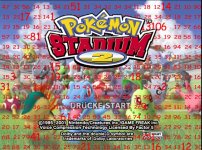
    Ok, so far so good. But when I dump the textures of a startscreen and mark them by using the HighResEaser script, the images are not sortable because I can't read the numbers on it. I added a screenshot as an attachment.
    (As you can see, the first number is 47. And the second.. ?)
    I had the same problem with my pokemon stadium pack
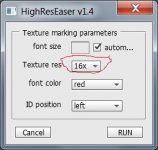
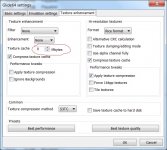
    I changed the Texture res to *16
    The font size is limited and the numbers are not cut with big textures
    Attached Thumbnails Attached Thumbnails Glide64_POKEMON_STADIUM_02.jpg  

  3. #13
    The German Lama Luna's Lama's Avatar
    Join Date
    Feb 2012
    Posts
    11
    Quote Originally Posted by NES_player4LIFE View Post
    push 'D' key
    But this only turns the dumping off/on.
    The Problem is that some images are already shown on the screen and they are marked as "seen" by the glide64 plugin.
    So when I turn the dumping off then on, nothing will happen. But I fixed that by re-opening the stage, and scanning the screen again.
    It's a way more complicated but it works.

    I had the same problem with my pokemon stadium pack
    I changed the Texture res to *16
    The font size is limited and the numbers are not cut with big textures
    What do you mean with changing the texture res to *16? In PK2 the most of the background images are already 16x16 pixels.
    Your screenshot looks like you figured out how to handle the problem but I don't get it.

  4. #14
    EmuTalk Member
    Join Date
    Oct 2011
    Posts
    22
    Quote Originally Posted by Luna's Lama View Post
    The Problem is that some images are already shown on the screen and they are marked as "seen" by the glide64
    I had this problem too and solved it with disabling texture cache
    glide64 will dump all textures after pressing D

    Quote Originally Posted by Luna's Lama View Post
    What do you mean with changing the texture res to *16? In PK2 the most of the background images are already 16x16 pixels.
    Your screenshot looks like you figured out how to handle the problem but I don't get it.
    You have to increase the resolution
    set it to x16 as shown in the screenshot
    Attached Thumbnails Attached Thumbnails texture res.jpg   disable cache.jpg  

  5. #15
    The German Lama Luna's Lama's Avatar
    Join Date
    Feb 2012
    Posts
    11
    Thanks stone64, your advice were helpful
    So I'm much further in this project but there's another problem I can't solve without help.
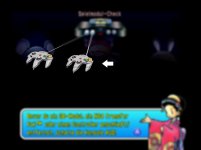
    I'm trying to retexture an image of a n64 controller. But it doesn't work. The image looks weird.
    Attached Thumbnails Attached Thumbnails controllerissue.jpg  

  6. #16
    EmuTalk Member
    Join Date
    Oct 2011
    Posts
    22
    it seems like some textures are not replced properly
    I don't know a solution for this
    I'll have to leave them out


    • Advertising

      advertising
      EmuTalk.net
      has no influence
      on the ads that
      are displayed


Page 2 of 2 FirstFirst 12

Posting Permissions

  • You may not post new threads
  • You may not post replies
  • You may not post attachments
  • You may not edit your posts
  •