Results 1 to 10 of 10
  1. #1
    Conspiracy Researcher NOBLE STAR's Avatar
    Join Date
    Nov 2006
    Location
    Illinois
    Posts
    9

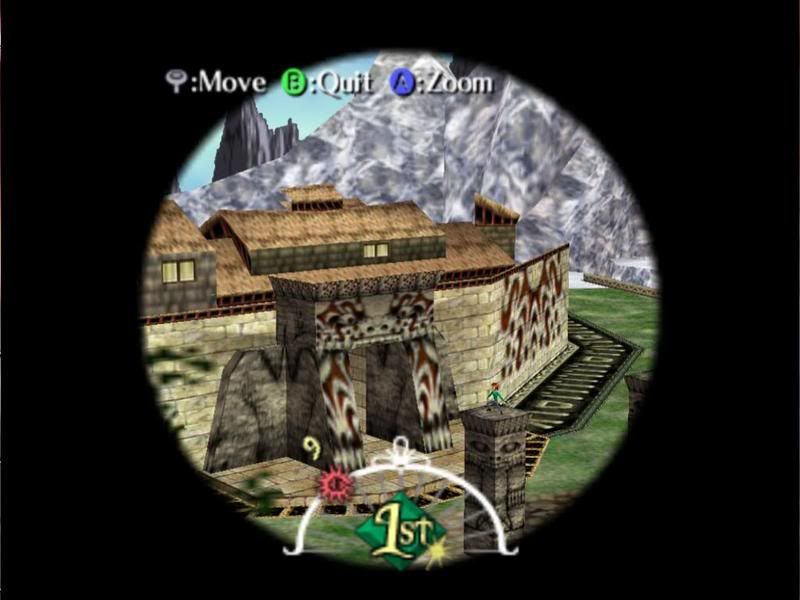
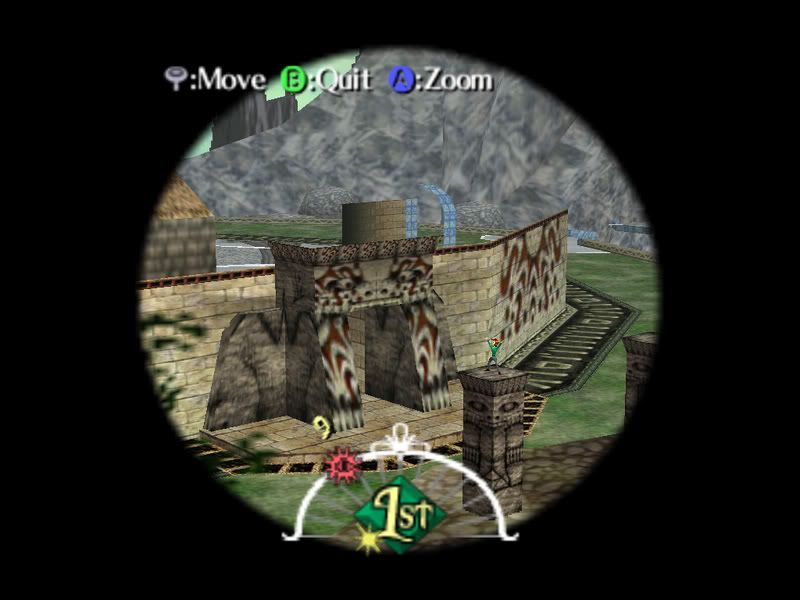
    ZELDA MM Distance Problem...

    Plugin used - Direct64 v0.5.03.25


    Plugin used - Direct3D8 1.6
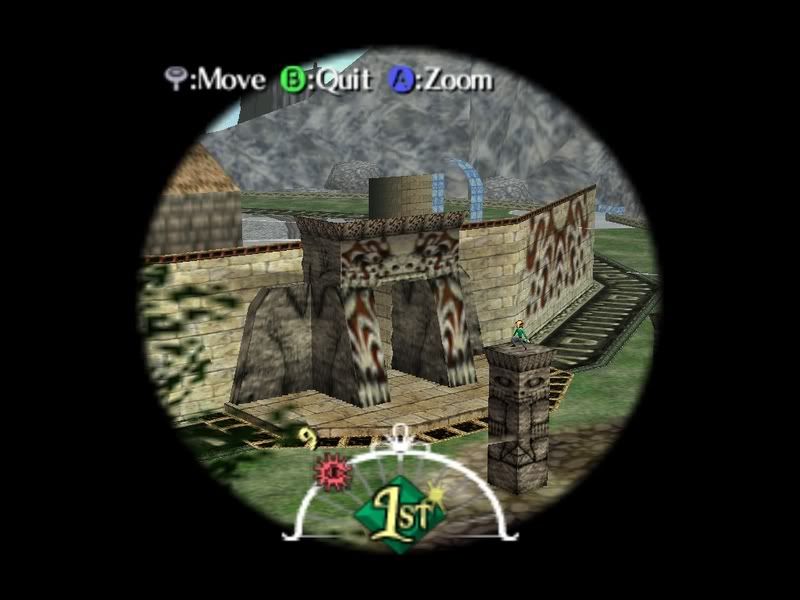


    Also, using the Direct3D transform helps,

    Without Direct3D transform...
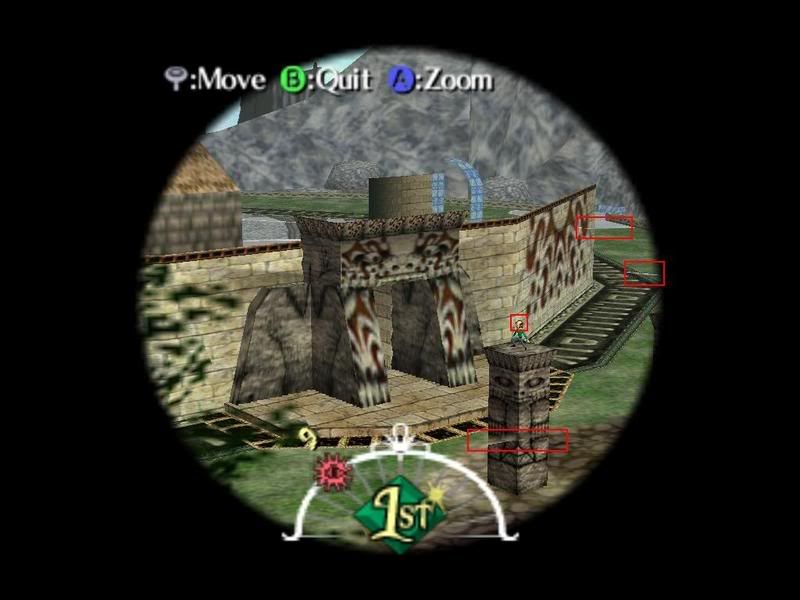


    With Direct3D transform...
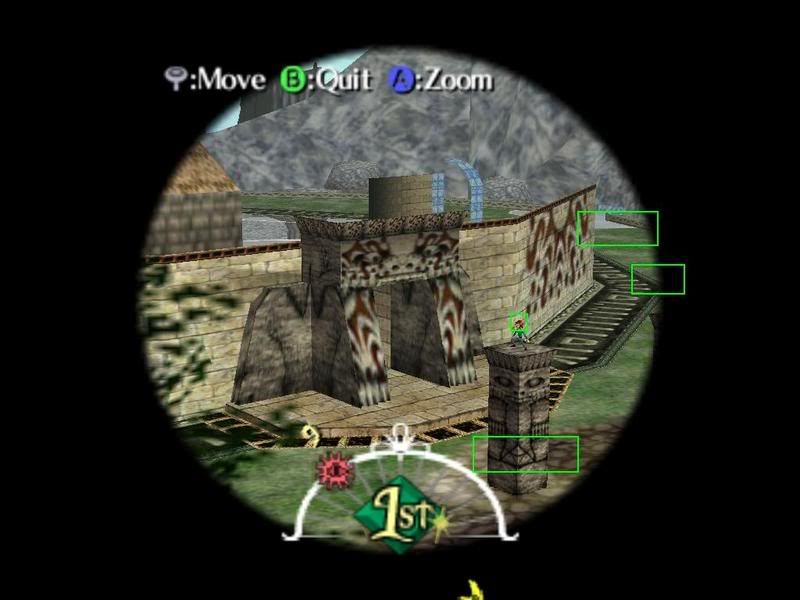


    Yup.


    • Advertising

      advertising
      EmuTalk.net
      has no influence
      on the ads that
      are displayed


  2. #2
    The Great Gunblade Wielder squall_leonhart's Avatar
    Join Date
    Jan 2006
    Location
    All over the world.
    Posts
    3,239
    This isn't Project 64's problem

    its the plugins problem!

    wait.. nvm.. didn't read the thread properly before.

    what video hardware do you have.

    i can't reproduce this with my FX 5900xt
    Last edited by squall_leonhart; November 18th, 2006 at 02:50.

  3. #3
    Conspiracy Researcher NOBLE STAR's Avatar
    Join Date
    Nov 2006
    Location
    Illinois
    Posts
    9
    Quote Originally Posted by squall_leonhart View Post
    This isn't Project 64's problem

    its the plugins problem!

    wait.. nvm.. didn't read the thread properly before.

    what video hardware do you have.

    i can't reproduce this with my FX 5900xt

    I'm using PJ64 1.6 with
    EVGA 6600GT.
    Click on my sig
    for some info about me...


    A Few of my PC specs:
    Operating System - XP Pro 64-bit / CPU - AMD Athlon 64 3400+ 2.20 Ghz (Overclocked to 2.40 Ghz) / Video Card - EVGA 6600GT 256MB PCI-E / Memory - 1 GB PC3200 / Hard Drive - Western Digital Caviar RE 250GB SATA150

  4. #4
    Oops. Died again. Tre's Avatar
    Join Date
    Nov 2006
    Location
    USA
    Posts
    231
    NOBLE STAR, that's a nice little workaround you've come up with there. I've been using the Direct3D8 1.6 plugin, since the 1.5.2 doesn't really do it for me, and I can't get Glide64 to look too much better (Link looks icky in the Submenus)... but this made some of the minor irritating things better. My Nintendo 64 logo looks correct (minus a small white line that goes from top to bottom as though it were a "flare" effect of some sort), the song's graphic show looks perfect, the stones look perfect, and other little annoyances are clear. And while I know this is to help with Majora's Mask... well it just made Ocarina of Time look MUCH better for me. Kudos.
    ::Computer specs::
    CPU: AMD Athlon XP 3200+ @ 2.20Ghz CPU [MSI chipset] // OS: Win XP Pro - SP2 // Memory: 2 PNY 1GB DDR [400Mhz] //
    Video: ATI Radeon HD2600 XT AGP [512MB GDRR3] // Audio: Creative SB X-Fi Fatal1ty [64MB] // Storage: 950GB [3 IDE drives]

    ::My PJ64 settings::
    V.1.6 w/RDB v1.6.016 Update // Jabo's Direct3D8 1.6 // Azimer's HLE Audio v0.56 WIP 2 // N-Rage's Direct-Input V2 1.83

  5. #5
    Conspiracy Researcher NOBLE STAR's Avatar
    Join Date
    Nov 2006
    Location
    Illinois
    Posts
    9
    Quote Originally Posted by Tre View Post
    NOBLE STAR, that's a nice little workaround you've come up with there. I've been using the Direct3D8 1.6 plugin, since the 1.5.2 doesn't really do it for me, and I can't get Glide64 to look too much better (Link looks icky in the Submenus)... but this made some of the minor irritating things better. My Nintendo 64 logo looks correct (minus a small white line that goes from top to bottom as though it were a "flare" effect of some sort), the song's graphic show looks perfect, the stones look perfect, and other little annoyances are clear. And while I know this is to help with Majora's Mask... well it just made Ocarina of Time look MUCH better for me. Kudos.
    Yup, I remember when I had an old pc with cheap integrated graphics chip, "damn you compaq 5000T with intel 82810e chip", anywho no matter what I tried I had issues that couldn't be solved... Now I can run games like F.E.A.R., Half Life 2/Lost Coast, and PREY with everything on max except for soft shadows and high antilising.
    Last edited by NOBLE STAR; November 18th, 2006 at 03:31.
    Click on my sig
    for some info about me...


    A Few of my PC specs:
    Operating System - XP Pro 64-bit / CPU - AMD Athlon 64 3400+ 2.20 Ghz (Overclocked to 2.40 Ghz) / Video Card - EVGA 6600GT 256MB PCI-E / Memory - 1 GB PC3200 / Hard Drive - Western Digital Caviar RE 250GB SATA150

  6. #6
    Oops. Died again. Tre's Avatar
    Join Date
    Nov 2006
    Location
    USA
    Posts
    231
    I'm likely going to upgrade my graphics card and throw in some kind of a 3D card... I just haven't felt like doing even more upgrades to the computer recently. But I am glad that you made this thread, it gave me some tricks to getting more out of an already great emulator.
    ::Computer specs::
    CPU: AMD Athlon XP 3200+ @ 2.20Ghz CPU [MSI chipset] // OS: Win XP Pro - SP2 // Memory: 2 PNY 1GB DDR [400Mhz] //
    Video: ATI Radeon HD2600 XT AGP [512MB GDRR3] // Audio: Creative SB X-Fi Fatal1ty [64MB] // Storage: 950GB [3 IDE drives]

    ::My PJ64 settings::
    V.1.6 w/RDB v1.6.016 Update // Jabo's Direct3D8 1.6 // Azimer's HLE Audio v0.56 WIP 2 // N-Rage's Direct-Input V2 1.83

  7. #7
    The Great Gunblade Wielder squall_leonhart's Avatar
    Join Date
    Jan 2006
    Location
    All over the world.
    Posts
    3,239
    ah ok, ... had the wrong plugin on...

    yeah i get this... i think its related to some distance clipping problem with jabo's plugin,... does it occur in the dx6 plugin as well... some bugs are in jabo's d3d8 that were fixed in d3d6...

  8. #8
    Conspiracy Researcher NOBLE STAR's Avatar
    Join Date
    Nov 2006
    Location
    Illinois
    Posts
    9
    Quote Originally Posted by Tre View Post
    I'm likely going to upgrade my graphics card and throw in some kind of a 3D card... I just haven't felt like doing even more upgrades to the computer recently. But I am glad that you made this thread, it gave me some tricks to getting more out of an already great emulator.
    Cool, I'm happy that I was able to help out in some way.

    Quote Originally Posted by squall_leonhart View Post
    ah ok, ... had the wrong plugin on...

    yeah i get this... i think its related to some distance clipping problem with jabo's plugin,... does it occur in the dx6 plugin as well... some bugs are in jabo's d3d8 that were fixed in d3d6...
    Hmm, nope the issue is still there even with the Direct3D6 plugin.

    Click on my sig
    for some info about me...


    A Few of my PC specs:
    Operating System - XP Pro 64-bit / CPU - AMD Athlon 64 3400+ 2.20 Ghz (Overclocked to 2.40 Ghz) / Video Card - EVGA 6600GT 256MB PCI-E / Memory - 1 GB PC3200 / Hard Drive - Western Digital Caviar RE 250GB SATA150

  9. #9
    The Great Gunblade Wielder squall_leonhart's Avatar
    Join Date
    Jan 2006
    Location
    All over the world.
    Posts
    3,239
    its not as bad though... the dudes hair is ok and the line on the top right.

  10. #10
    Conspiracy Researcher NOBLE STAR's Avatar
    Join Date
    Nov 2006
    Location
    Illinois
    Posts
    9
    Quote Originally Posted by squall_leonhart View Post
    its not as bad though... the dudes hair is ok and the line on the top right.
    Yeah his hair looks fine and there is a black line in the center at the top of the
    town's entrance, I hope they do something about this in Jabo's next D3D Plugin.
    Click on my sig
    for some info about me...


    A Few of my PC specs:
    Operating System - XP Pro 64-bit / CPU - AMD Athlon 64 3400+ 2.20 Ghz (Overclocked to 2.40 Ghz) / Video Card - EVGA 6600GT 256MB PCI-E / Memory - 1 GB PC3200 / Hard Drive - Western Digital Caviar RE 250GB SATA150

Similar Threads

  1. Zelda Windwaker problem
    By ArgJuli in forum Dolphin
    Replies: 2
    Last Post: July 14th, 2006, 00:25
  2. Problem with Paper Mario and Zelda Majora Mask
    By dreampeppers99 in forum Project64
    Replies: 2
    Last Post: July 5th, 2006, 13:19
  3. another zelda mmask problem
    By mizu in forum Project64
    Replies: 10
    Last Post: April 10th, 2006, 00:19
  4. Zelda: Masterquest Graphics Glitch & FPS problem
    By sonic1015 in forum Project64
    Replies: 9
    Last Post: February 5th, 2006, 11:48
  5. Small Zelda OOT graphics problem
    By ldfunreal in forum Project64
    Replies: 5
    Last Post: February 16th, 2003, 11:48

Posting Permissions

  • You may not post new threads
  • You may not post replies
  • You may not post attachments
  • You may not edit your posts
  •